.avif)

Peak season looks exciting from the outside, doesn’t it?
More customers.
More orders.
More revenue in a week than some brands see in a month.
But anyone who’s lived through Black Friday knows the part people avoid saying.
The moment sales take off, your system becomes the biggest risk in the room.
E-commerce companies see transaction volume jump 300% to 500% during peak season. Some spike higher. And 82% report slow pages, delayed orders, and customers dropping off before they buy.
That kind of failure hits fast.
You feel it the second traffic climbs.
Dashboards lag. Integrations fall behind. Your team watches checkout like it’s a ticking timer.
Because this isn’t a sales surge.
It’s a stress test.
And if NetSuite cracks under pressure, everything cracks with it.
We’ve seen one slow script turn into hours of backlog. Inventory desync. Payment delays. Support teams buried before leadership even knows something is wrong.
None of it caused by people. All of it caused by volume.
Peak season isn’t the time to react. It’s the time to know your system will hold, your data stays accurate, and your revenue won’t hinge on whether NetSuite can take the hit.
That’s what real support feels like when the season hits.
Peak Season Revenue And System Reliability Challenge
Peak season is where your P&L and your platform architecture collide.
On one side, a growing market and aggressive revenue targets. On the other, a NetSuite stack that was never really tested at 5x load.
The stakes are getting higher every year. B2C e-commerce is projected to grow from $8.1T in 2025 to over $20.7T by 2035, with mobile driving nearly 70% of all transactions.
That growth sounds great in a board deck. But it feels very different when your system is the bottleneck on the biggest weekend of the year.
Transaction volume goes from steady to violent
For a typical mid-market brand:
- Normal day: 1,000-5,000 transactions
- Peak season day: 3,000-25,000+ transactions
- Peak hours on Black Friday / Cyber Monday: 10-50x normal traffic
Most NetSuite environments were configured for the first number, not the last. So when volume spikes, the weak points show up fast:
- Response times blow out. Page load jumps from 2 seconds to 8-12 seconds.
- Checkout drags. Orders that should process in 5 seconds take 30-60 seconds.
- Inventory sync falls behind. Stock levels stop matching reality.
- Integrations lag. Payment gateways, 3PLs, marketplaces, and shipping APIs all start queuing instead of flowing.
- Databases choke. Queries pile up, locks increase, and batch jobs stall.
Business impact quantification
E-commerce benchmarks put the average conversion rate around 1.8% and cart abandonment at ~70% in normal conditions.
Once page load crosses 3 seconds, abandonment climbs toward 75-80%. A 1-second delay can cut conversions by around 7%.
Now add your own revenue math:
- Average order value: $75-$200
- Traffic spike: 10,000+ sessions in a peak hour
Even a partial outage or slowdown:
- Thousands of abandoned carts
- $100K-$500K+ in potential revenue at risk per bad hour
And that doesn’t include the compound damage: negative reviews, social callouts, and customers who quietly switch to a competitor that “just worked.”
One bad evening, one broken quarter
Take a $20M e-commerce company:
- Normal daily revenue: ~$50K
- Peak season daily potential: $250K-$500K
A 4-hour degradation on Friday from 5 p.m. to 9 p.m.:
- Direct revenue loss: $40K-$80K+
- 200-500 frustrated customers
- Support team fully consumed by live firefighting
Miss a couple of these windows and you are not just “having a rough weekend.”
You are missing annual targets because the system could not keep up with the demand you worked hard to create.
What “with support” versus “without support” really looks like
The volume is not optional. The risk is not theoretical.
If NetSuite performance is not part of your peak season plan, you are gambling with the most expensive days of your year.
Peak Season System Stress Points In NetSuite
Peak season exposes every weak spot in your NetSuite environment. What works at normal traffic becomes unstable when volume jumps 300% to 500%. None of these failures come out of nowhere. They follow patterns. Once you know the patterns, you can prevent them.
Database performance degradation
NetSuite was not designed for thousands of simultaneous transactions hitting the same records at once. When traffic surges, the database becomes the first point of strain.
You’ll see it in the basics:
- Queries stack up. Every order triggers multiple lookups. At 10x traffic, this becomes hundreds of thousands of queries per hour.
- Concurrent users spike. Normal is 50 to 100. Peak can hit 500 to 2,000 active users and integrations.
- Real-time dashboards lag. Reports that normally run in seconds start timing out.
- Batch processes fail. Inventory sync, settlement batches, and order consolidation jobs fall behind.
- Database locks increase. When too many updates hit the same table, everything slows.
The first breakdown usually comes from simple actions that become expensive under load.
- Inventory lookups slow down.
- Order routing creates bottlenecks.
- Customer history retrieval becomes sluggish.
- Reporting queries stall and freeze dashboards.
Once the database slows, every other part of the system feels it.
Third-party integration lag
During peak season, your integrations do not fail individually. They fail in chains. Traffic increases everywhere, not just in NetSuite.
The most common pain points:
- Payment processors like Stripe or PayPal delay responses.
- Warehouse and 3PL feeds get backed up.
- Shipping API calls slow down, delaying label creation.
- Transactional emails queue instead of sending.
- Analytics feeds fall behind by minutes or hours.
This is how you end up with customers paying successfully but receiving no confirmation email for an hour. It is also how inventory goes out of sync across channels.
Order processing workflow bottlenecks
At scale, every rule and every script costs time. What feels like “a few seconds” at normal traffic becomes minutes during peak.
- Order creation takes 10 to 30 seconds instead of 1 to 2.
- Validation rules slow down processing.
- Automatic fulfillment triggers late.
- Invoicing stalls.
- Inventory allocation runs behind.
When order processing lags, you get the dreaded cascade: a backlog, then delays, then customer complaints, then lost revenue.
API rate limiting issues
NetSuite has strict per-minute API limits. During peak season, it is common to exceed them without realizing it.
The result:
- Third-party apps get throttled
- Requests start queuing
- Data sync falls behind
- Race conditions appear
- Integrations desync and break in unpredictable ways
Most teams think they are under the limit. They only learn the truth when traffic spikes and integrations stop responding.
Reporting and dashboard delays
Executives need real-time visibility during peak season. Ironically, this is when NetSuite dashboards tend to fail.
- Dashboards timeout
- Saved searches crawl
- KPIs stop refreshing
- Reports pull stale data
Your support team flies blind. Leaders make decisions without accurate numbers.
Inventory sync failures
Nothing damages peak season more than inventory inaccuracies.
When NetSuite falls behind:
- Items oversell
- Amazon and Shopify desync
- Returned items do not restock in time
- Safety stock rules collapse
You end up promising products you do not have and canceling orders you could have fulfilled.
The real stress test: What load actually does
A typical load test makes the pattern clear:
- Normal load: 100 users, 5 second average response time
- 300% load: 300 users, 20 to 30 second response time
- 500% load: 500 users, 60 second timeouts
- 1000% load: full degradation or downtime
This is not a theoretical failure. It is predictable. And it is preventable with the right support.
Proactive Support Strategy For Peak Season
Peak season support isn’t about “being available.” It’s about engineering your environment so issues never reach customers in the first place.
The companies that survive 300%-500% transaction spikes aren’t the ones who respond fastest. They’re the ones who prepare months earlier with load-tested architecture, hardened integrations, and a support team that already knows what will break before traffic surges.
Below is the Stockton10 peak-season prevention framework built from real NetSuite environments, real outages we’ve fixed, and the recurring patterns we’ve seen across manufacturing and ecommerce operations under load.
Pre-Peak Season Planning (3-6 Months Before):
Capacity assessment
Infrastructure Optimization
Configuration review
Testing plan development
-
Weeks before peak season (4-8 weeks prior)
Performance tuning
Monitoring setup
Team preparation
Testing and validation
Days before peak season (1-2 weeks prior)
Final preparation
Redundancy verification
During peak season (real-time support)
Continuous monitoring
Proactive issue detection
Rapid incident response
On-the-fly optimization
Post-peak season (analysis and improvement)
Performance analysis
Optimization for next year
Key metrics and SLAs during peak season
Peak season success isn’t throwing spaghetti on the wall and checking what sticks. It’s math.
When transaction volume spikes 300-500%, performance can’t be “okay.” It must be measurable, predictable, and tightly controlled.
These are the benchmarks high-performing NetSuite environments hit when the system is under its hardest load.
System availability metrics
During peak, availability isn’t optional. It’s the baseline. Every second of downtime directly impacts revenue, customer experience, and inventory accuracy.
Uptime target
System uptime becomes non-negotiable during peak season. Even minutes of downtime can result in lost sales, abandoned carts, and inaccurate inventory.
- Normal season (99.5% acceptable): Minor downtime is manageable during standard operations, as long as business-critical workflows stay uninterrupted.
- Peak season (99.9%+ required): Less than 1 hour of downtime per week ensures selling hours and fulfillment operations remain continuous.
- Critical peak hours (99.95%+ required): During Black Friday or flash sales, the system must not drop below 99.95% availability to avoid catastrophic cart losses.
Response time target
Page load speed directly affects conversion. These targets keep the shopping experience frictionless even under heavy load.
- Normal (<3 seconds): Median page loads should stay fast enough to maintain baseline conversion rates.
- Peak (<5 seconds): Performance can dip slightly under extreme traffic but must remain usable.
- API calls (<500ms): Integration speed must stay under half a second to avoid cascading delays.
- Report generation (<30 seconds): Dashboards must remain responsive so teams can make real-time decisions.
Transaction processing speed
Fast processing is what prevents inventory misalignment, double-selling, and fulfillment delays during volume spikes.
- Order processing (<5 seconds): Orders must update inventory quickly to stay aligned across channels.
- Fulfillment request generation (<10 seconds): Warehouses depend on timely requests to prevent shipping delays.
- Invoice generation (<20 seconds): Billing workflows must keep pace with high transaction volume.
- Payment processing (<3 seconds): Slow payment capture increases abandonment and failed checkouts.
Data accuracy
Accuracy cannot be sacrificed during high load. These thresholds ensure what customers see matches what operations deliver.
- Inventory accuracy (99%+): Real-time multi-channel sync must remain reliable within a 30-second window.
- Order accuracy (99.9%+): Line items, pricing, and shipping rules must remain correct under stress.
- Payment accuracy (100%): Duplicate charges or missed captures are unacceptable in any condition.
- Tax calculation (99.95%+): Ensures legally correct checkout totals across state/local requirements.
Operational metrics
Operational control becomes the differentiator during peak. These metrics keep support workflows fast, efficient, and aligned with customer experience goals.
Support Team Performance
- Critical issue response time: <15 minutes: Ensures revenue-impacting issues get immediate attention.
- Normal issue response time: <1 hour: Maintains momentum without queue buildup.
- Mean time to resolution: <4 hours: Keeps operations steady during ongoing load.
- Issue resolution rate: 80%+ first contact: Reduces escalations and supports speed.
Customer Experience Metrics
- Abandoned cart rate: <72%: Industry baseline is 68%; peak season normally drives cart dropout to 75-80%.
- Conversion rate maintained: within -5% to +5%: Avoids the typical peak-season drop caused by slow systems.
- Page load satisfaction: 95%+: Majority of users experience sub-5-second loads.
- Customer satisfaction: NPS >50: High performance maintained despite heavy seasonal pressure.
Financial Metrics
- Revenue protected: >95% of last year’s peak: Avoids performance-related losses.
- Order accuracy: <0.1% system-caused returns: Ensures workflows don’t create financial leakage.
- Payment processing: <0.01% failed transactions: Beats the industry average of 0.05%.
- Chargeback rate: <0.1%: Limits fraud and error exposure.
Incident tracking
Clear severity levels prevent confusion during high-pressure windows. These definitions align teams on exactly how fast issues must be handled.
Severity Levels
- Critical: System down or major functionality broken; response <15 minutes, resolution <1 hour.
- High: Significant degradation or partial feature failure; response <1 hour, resolution <4 hours.
- Medium: Isolated performance issues; response <4 hours, resolution <24 hours.
- Low: Minor bugs with workarounds; response <24 hours, resolution <48 hours.
In-House Support Challenge During Peak
When NetSuite performance becomes a board-level risk, most teams discover the limits of an internal-only model. Peak season exposes every gap in staffing, process, and platform knowledge at the same time.
Resource constraints
Even strong internal IT teams are designed for business-as-usual, not Black Friday chaos. During peak, the same people are stretched across incidents, projects, and ad hoc requests.
- Competing priorities: Internal staff juggle development, maintenance, and routine support while peak incidents pile up, which slows down resolution.
- Sudden demand spikes: Ticket volume multiplies in days, but you cannot spin up temporary NetSuite engineers at the same speed.
- On-call fatigue: Rotating on-call for weeks of high severity incidents leads to burnout and decision fatigue by the end of peak.
- Context switching: Engineers bounce between warehouse issues, checkout errors, and integration failures, which extends time to root cause.
- Single point of failure risk: If the one person who “really knows NetSuite” is sick or offline, critical issues stall.
Expertise gaps
Most internal teams are broad, not deep. Peak season problems tend to sit in the deepest parts of NetSuite and its integrations.
- Limited e-commerce specialization: General IT staff understand infrastructure but may not know how NetSuite behaves under flash-sale traffic patterns.
- Shallow NetSuite expertise: Without senior platform specialists, teams struggle with SuiteScript performance, saved search tuning, and workflow impact.
- Integration blind spots: Payment gateways, WMS, 3PL, and Shopify connectors fail in subtle ways that require hands-on, multi-implementation experience.
- Performance tuning complexity: Indexing, script governance, and SuiteCloud Plus configuration demand specialized skills that most IT teams do not have in-house.
- Slow decisions: Engineers often wait for director or vendor approvals on risky changes, which delays fixes when minutes matter.
Cost structure
The internal model is expensive precisely where you do not get flexibility: capacity, overtime, and unused infrastructure.
- Fixed headcount costs: Salaries, benefits, and overhead are locked in and do not flex with seasonal demand.
- Overtime premiums: Peak coverage usually means 1.5x to 2x pay, which inflates labor cost per incident.
- Idle capacity for most of the year: Infrastructure is often overprovisioned for November and December, then underutilized the remaining ten months.
- Lost strategic work: Critical roadmap items slip because the same team is fighting fires during the most important revenue period.
- Ongoing training spend: Keeping staff current on NetSuite and integrations requires continuous investment.
Example: 100 Million dollar e-commerce company
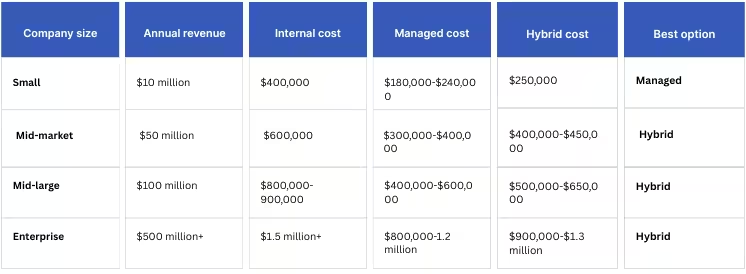
For a typical 100 million dollar merchant, the internal-only cost picture adds up quickly.
- Internal IT team: 5 people at 120,000 dollars average total comp is roughly 600,000 dollars annually.
- Peak season overtime: Two heavy months at 40 extra hours per person per week can easily add 40,000 dollars.
- Peak-ready infrastructure: Overprovisioned environments for performance headroom often cost 100,000 to 200,000 dollars per year.
- Opportunity cost: Delayed strategic initiatives conservatively represent another 50,000 dollars or more in lost value.
Total internal peak-ready cost often lands between 800,000 and 900,000 dollars per year.
Managed NetSuite Support Advantage
A managed support model treats peak season as a known, engineered event rather than a yearly emergency. You buy a mature operating rhythm, not just extra hands.
Dedicated expertise
Managed partners are built for exactly the class of problems that hurt you most at peak.
- NetSuite-first specialists: You get consultants who live inside NetSuite performance, script governance, and SuiteCloud Plus configuration every day.
- E-commerce optimization focus: Teams understand cart, checkout, fulfillment, and inventory flows, not just generic ERP processes.
- Depth in performance tuning: Specialists bring proven patterns for saved search optimization, script refactors, indexing, and caching.
- True 24/7 coverage: Follow-the-sun teams prevent incidents from waiting for your local time zone to wake up.
- No single point of failure: Bench strength across multiple consultants reduces risk if someone is unavailable.
Predictable cost
Instead of unpredictable overtime and infrastructure spend, you move to a service model with clear expectations and pricing.
- Fixed monthly retainer: You know your support cost up front, without surprise overtime spikes.
- Elastic capacity: The partner absorbs seasonal volume, so you do not need to overbuild internal teams or hardware.
- Built-in monitoring and optimization: Health checks, tuning, and preventive work are included instead of being “good we have it” projects.
- Contract-backed SLAs: Response and resolution targets are formalized and enforced.
- Operational expenditure model: You avoid large capital purchases and keep financial flexibility.
Example: Same 100 million dollar company
For the same business, a managed model typically reshapes the cost profile.
- Managed NetSuite support fee: A 30,000 to 50,000 dollar monthly engagement totals 360,000 to 600,000 dollars annually.
- Included services: That amount usually covers 24/7 monitoring, incident response, performance tuning, and proactive maintenance.
- Internal redeployment: Existing IT capacity can be reassigned to growth, analytics, or product work instead of firefighting.
Total managed cost is often 15% to 25% lower than full internal, with materially better peak readiness.
Hybrid Approach
Many high-growth merchants settle on a hybrid model that blends strategic internal ownership with external operational muscle.
Internal team (strategic focus)
Your internal team keeps the business context, roadmap, and vendor accountability.
- Small, senior footprint: One to two senior NetSuite specialists focus on architecture, roadmap, and continuous improvement.
- Closer to the business: They translate commercial goals into platform priorities and hold partners accountable.
- Lean annual cost: Total internal spend typically sits around 200,000 to 250,000 dollars.
Managed support partner (operational focus)
The partner operates NetSuite like a utility: monitored, tuned, and supported around the clock.
- Around-the-clock operations: They handle incidents, alerts, and performance anomalies as they appear.
- Proactive maintenance: Regular patching, cleanup, and tuning prevent small issues from turning into peak-season outages.
- Manageable spend: A 300,000 to 400,000 dollar annual contract covers most operational needs.
Benefits of hybrid approach
The hybrid model is usually the best fit for mid-market and larger merchants that care about both control and resilience.
- Strategic focus preserved: Internal leaders stay focused on optimization, analytics, and revenue-driving initiatives.
- Continuous coverage: You get 24/7 response without building a large on-call roster of your own.
- Healthy tension: Vendor and internal teams keep each other sharp, which improves outcomes.
- Scalable model: You can grow internal capability over time without a step-change in total cost.
- Reduced key-person risk: Knowledge and execution are distributed, not concentrated in one engineer.
Cost-benefit comparison by company size
Peak Season Support Implementation Timeline
A strong peak season is built month by month, not in a frantic sprint in October.
This timeline gives your NetSuite and operations teams a concrete rhythm for getting ready, executing, and learning.
January to February: Post-peak analysis
Use the quietest months to dissect what really happened during the last peak and lock in decisions for the next cycle. This is where you convert firefights into structured improvements.
- Review peak performance: Reconstruct timeline, incidents, and major slowdowns so you have a clear narrative, not just isolated tickets.
- Run root cause analysis: Document technical, process, and staffing root causes for every critical and high incident, with explicit owners.
- Plan technology investments: Prioritize needed changes such as SuiteCloud Plus, infrastructure upgrades, or new monitoring based on actual impact.
- Capture team feedback: Collect input from support, warehouse, finance, and customer service while the pain is still fresh.
- Draft next-year roadmap: Translate all of this into a working roadmap for NetSuite, integrations, and support process changes.
March to April: Strategy and planning
Once you know what broke and why, you can design a realistic support model and secure budget before the year gets away from you.
- Assess capacity and risk: Map expected order growth, channel expansion, and planned campaigns to NetSuite and integration load.
- Define infrastructure needs: Decide what you must scale, tune, or refactor to safely absorb projected peak volume.
- Design support strategy: Choose internal, managed, or hybrid support and define hours, coverage model, and responsibilities.
- Secure budget and approvals: Lock in funding for tools, licenses, and external partners before peak projects compete with other priorities.
- Select vendors: If you are outsourcing, shortlist and sign with partners who can support NetSuite and key integrations under SLAs.
May to June: Preparation begins
By mid-year, you should already be making tangible changes to the environment, not just talking about them.
- Upgrade infrastructure: Apply planned environment changes such as database capacity, SuiteCloud Plus, or CDN improvements.
- Optimize NetSuite configuration: Clean up workflows, saved searches, and forms that are known performance offenders.
- Deploy monitoring tools: Implement or upgrade APM, NetSuite performance dashboards, and logging for all critical services.
- Establish performance baselines: Measure current response times, throughput, and error rates under normal load.
- Plan load testing: Define test scenarios, data, and tools that will simulate Black Friday level demand.
July to August: Intensive preparation
This is your main rehearsal window. Real load testing and multi-team drills happen here, not in the last two weeks before peak.
- Execute load tests: Run structured tests at 300, 500, and 1,000 percent of normal load and record where the system fails.
- Resolve bottlenecks: Fix the slowest queries, scripts, and integrations, then retest until bottlenecks move or disappear.
- Train support teams: Walk teams through incident playbooks, escalation paths, and NetSuite-specific troubleshooting flows.
- Test integrations end to end: Validate flows with payment gateways, WMS, 3PLs, marketplaces, and email providers under stress.
- Finalize response plans: Freeze your incident runbooks, roles, and communication templates for critical issues.
September to October: Final preparation
The goal here is to stabilize, remove last-minute risk, and make sure everyone knows their role once traffic hits.
- Run final optimization pass: Address remaining high-impact queries, workflows, and scripts without introducing new complexity.
- Verify redundancy: Test failover, secondary databases, backup jobs, and recovery procedures in realistic scenarios.
- Lock on-call schedules: Publish and confirm primary and secondary responders for every critical system.
- Validate backups and recovery: Perform test restores so you know backups actually work, not just that they exist.
- Prepare customer communication: Draft planned-status updates for maintenance windows or known risks if they materialize.
November to December: Peak season execution
During peak, the focus shifts from change to control. You keep the system stable, react quickly, and feed executives accurate information.
- Monitor continuously: Watch real-time dashboards for response times, error rates, queue depth, and integration health.
- Respond in real time: Use playbooks to triage and resolve incidents quickly while documenting decisions.
- Optimize carefully on the fly: Apply low-risk configuration and query changes to relieve hotspots without destabilizing the system.
- Coordinate across teams: Maintain tight communication between IT, operations, finance, and customer service during peak hours.
- Report to executives: Provide concise performance, incident, and risk updates so leadership can make informed decisions.
Protect Your Peak Season Revenue
Peak season is not the time to hope your systems hold. It's the time to know.
If you want a clearer, calmer, and more controlled Black Friday-to-holiday run, start with a comprehensive system readiness assessment built specifically for high-volume NetSuite teams.
Schedule Your Peak Season Support Assessment
A short, no-pressure consultation designed to reveal whether your current setup can survive peak traffic and what to strengthen before it matters most.
- Current system readiness evaluation
- Capacity and bottleneck analysis
- Support strategy recommendation
- Gap identification
- Improvement roadmap
- No obligation consultation
Protect your peak season revenue by ensuring system reliability, stable performance, and a frictionless customer experience during the highest-stakes weeks of your year.


.avif)