
You inherited 50 custom SuiteScripts. Half are version 2.0, half are 2.1.
Nobody documented why they were written differently. The developer who built them left 18 months ago.
Last week, a NetSuite update broke three of them, and you spent 12 hours troubleshooting code nobody understands.
Sound familiar?
This is the custom code continuity problem. SuiteScript works great until the person who wrote it leaves. Then it becomes technical debt that breaks during NetSuite releases and nobody knows how to fix it.
This guide covers the real differences between SuiteScript 2.0 (launched 2015) and 2.1 (launched 2021), when migration actually makes sense, and the step-by-step process to do it safely.
More importantly, we'll talk about why migration is easy but maintaining custom code over time is hard.
SuiteScript 2.1 vs 2.0: What Actually Changed
NetSuite released SuiteScript 2.0 in 2015 and 2.1 in 2021. Both versions use the same module system and follow the same governance rules. The differences show up in JavaScript syntax, async support, and code readability.
API version annotations explained
Every SuiteScript file starts with a header that tells NetSuite which version to use.
The three options:
javascript
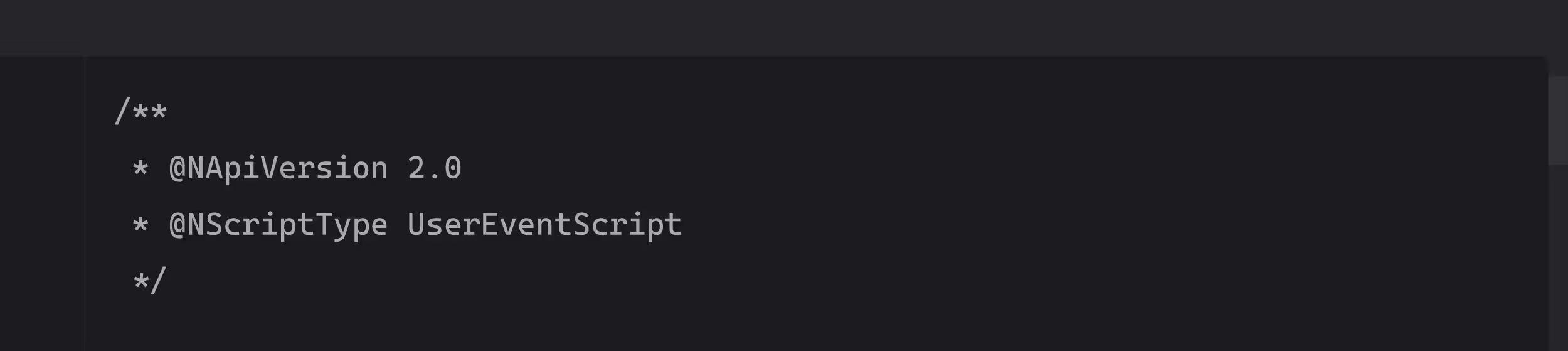
This locks your script to SuiteScript 2.0. Uses ES5 JavaScript syntax only. No modern features.
javascript
.avif)
This runs SuiteScript 2.1. Supports ES6+ features like async/await, arrow functions, and template literals.
javascript
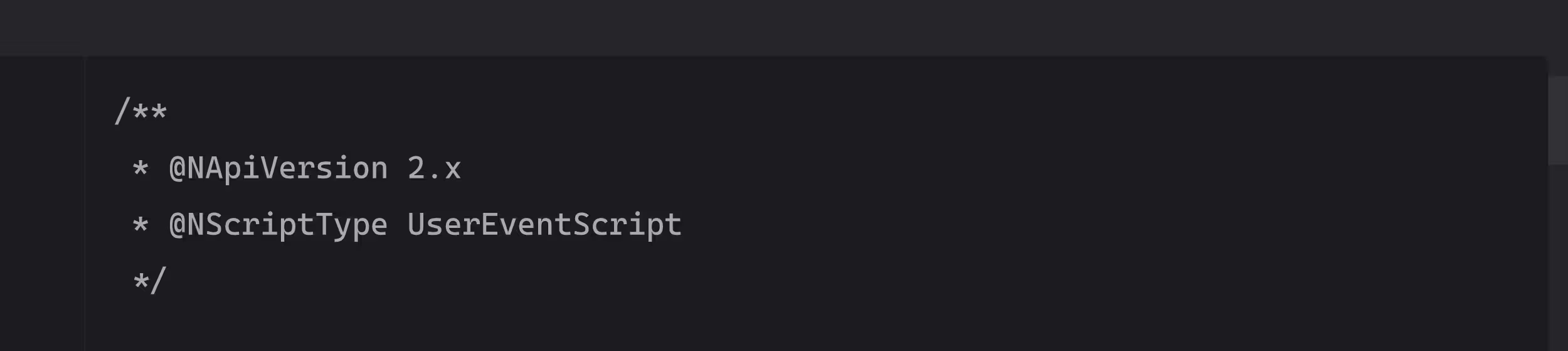
This auto-selects the latest available version NetSuite supports (currently 2.1, but will upgrade to 2.2+ when released). Future-proofs your scripts but gives you less control over breaking changes.
What the annotation actually does: It tells the NetSuite JavaScript engine which language features are available and how to execute your code. Change this one line incorrectly and your script breaks in production.
JavaScript syntax support (ES5 vs ES6+)
This is the biggest visible difference between versions.
SuiteScript 2.0 uses ES5 (2015 JavaScript standard):
javascript
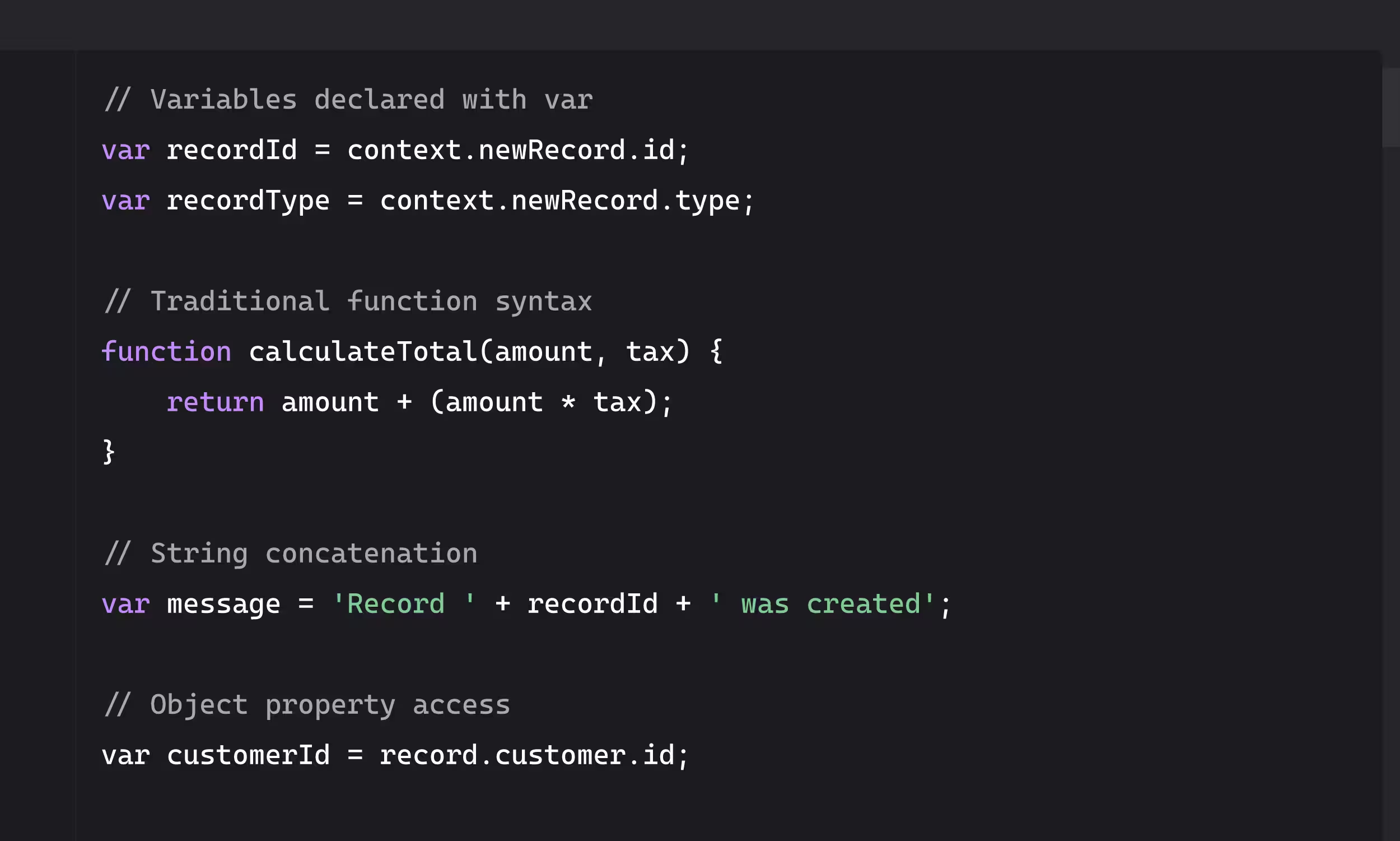
This works. It's just old and harder to read.
SuiteScript 2.1 uses ES6+ (2019+ JavaScript standard):
javascript
.avif)
Same functionality, cleaner code, easier to maintain.
Why this matters: Modern syntax isn't just about looking nice. It prevents bugs. const and let have block scope, which eliminates hoisting issues. Arrow functions handle this context more predictably. Template literals prevent string concatenation errors.
When someone has to debug your script at 2 am because a NetSuite release broke it, readable code matters.
Async/await and Promises
This is the killer feature that makes 2.1 worth considering.
SuiteScript 2.0 has no native async support. If you need to make API calls or handle asynchronous operations, you're stuck with callbacks:
javascript
.avif)
Nested callbacks are hard to read, hard to debug, and hard to maintain. Error handling gets messy fast.
SuiteScript 2.1 supports Promises and async/await:
javascript
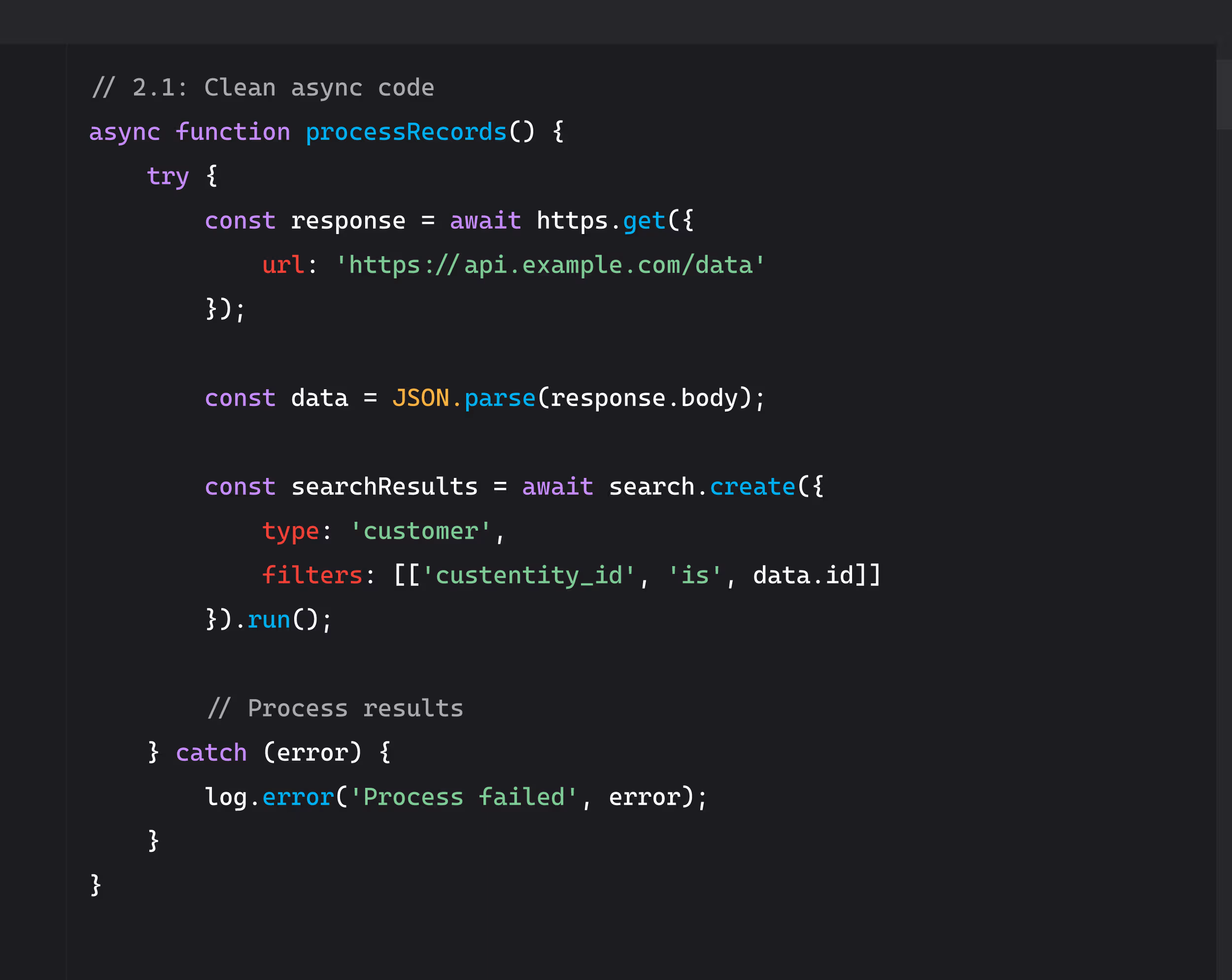
This reads top to bottom. Errors are caught in one place. Anyone can understand what's happening.
Performance impact: Async/await doesn't make scripts run faster. It makes them easier to write and maintain, which matters more when you're debugging at 2am.
Module system (AMD define patterns)
Both versions use the same AMD (Asynchronous Module Definition) pattern. No difference here.
Standard module import pattern for both 2.0 and 2.1:
javascript
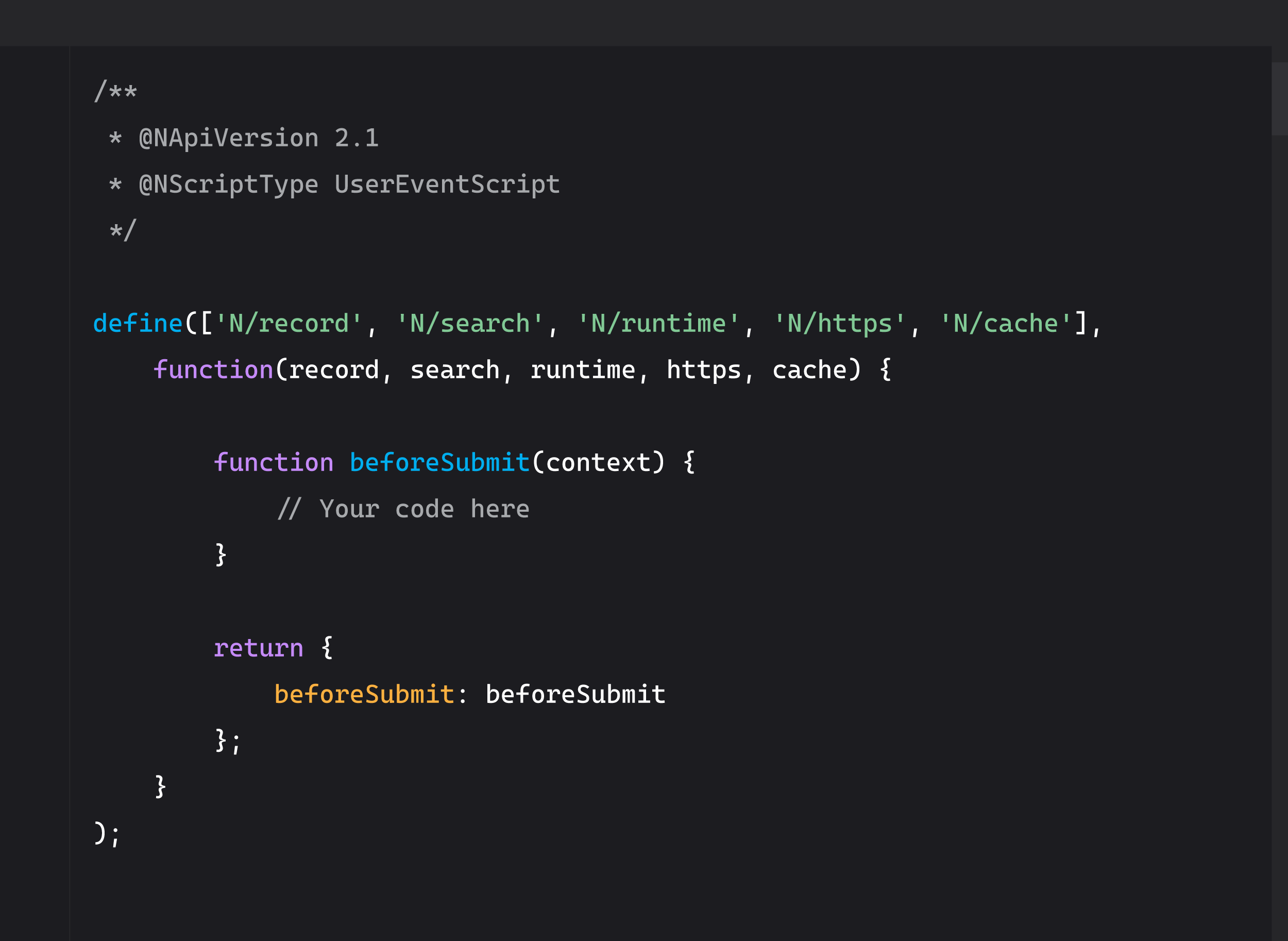
Common modules you'll use:
- N/record - Create, load, save records
- N/search - Search and retrieve data
- N/runtime - Get script execution context
- N/task - Schedule Map/Reduce or other tasks
- N/https - Make external API calls
- N/sftp - Transfer files via SFTP
- N/cache - Store temporary data
The module system stays consistent. Your imports don't break when upgrading versions.
Performance improvements
Is SuiteScript 2.1 actually faster than 2.0?
Short answer: Not meaningfully.
NetSuite's JavaScript engine runs both versions with similar performance. The governance units (execution limits) are identical. A search that costs 10 governance units in 2.0 still costs 10 in 2.1.
What did improve:
- Error messages are clearer in 2.1
- Debugging tools work better with modern syntax
- Code executes slightly more efficiently with const/let (but you won't notice)
What matters more: Code that's easier to read and maintain causes fewer production issues. The "performance improvement" is fewer broken scripts and faster debugging when things do break.
Should You Migrate from SuiteScript 2.0 to 2.1?
Not every script needs migration. Here's how to decide.
When migration makes sense
- You're writing new scripts: Always use @NApiVersion 2.1 or 2.x for new development. No reason to start with outdated syntax.
- Existing scripts need async/await: If you're making external API calls, processing large datasets asynchronously, or dealing with callback hell, 2.1 makes life easier.
- Code readability matters: You have a team maintaining scripts. Modern syntax means new developers can understand code faster.
- Active maintenance required: Scripts that change frequently benefit from cleaner code. Less time debugging means more time building.
- You're already touching the code: If you're modifying a 2.0 script anyway, upgrade the version while you're in there. The effort is minimal.
When to stay on 2.0
- Legacy scripts that work fine: If it's not broken and nobody's maintaining it, leave it alone. The risk of breaking production outweighs the benefit of modern syntax.
- No one understands the codebase: Migrating syntax you don't understand is dangerous. Document and understand it first, then consider migration.
- Critical production systems: Don't touch scripts that handle revenue recognition, financial close, or order fulfillment unless you have comprehensive test coverage and a rollback plan.
- No sandbox environment: If you can't test changes safely, don't make them. Period.
The documentation problem
Before you decide to migrate anything, answer these questions:
- Can you list every custom script in your NetSuite account?
- Do you know which scripts are 2.0 vs 2.1 vs 2.x?
- Is there documentation explaining what each script does and why it exists?
- Are dependencies mapped? (Which scripts call which other scripts or integrations?)
- What happens when your developer leaves? Does the next person inherit tribal knowledge or actual documentation?
If you answered "no" to any of these, you don't have a migration problem. You have a custom code governance problem.
The real question
It's not "should we migrate SuiteScript 2.0 to 2.1?"
It's "do we have governance around custom code that survives developer turnover, NetSuite updates, and business changes?"
Migration is a one-time project. Governance is continuous. Get governance right first, then migration becomes straightforward.
SuiteScript 2.0 to 2.1 Migration: Step-by-Step Guide
If you've decided migration makes sense, here's how to do it safely without breaking production.
Step 1: Audit your current scripts
Before changing anything, know what you have.
Create a script inventory:
- List every custom script deployed in your account
- Document the script type (User Event, Scheduled, RESTlet, Suitelet, Map/Reduce, etc.)
- Note the current API version (@NApiVersion 2.0, 2.1, or 2.x)
- Record what each script does (business purpose, not technical details)
- Identify who wrote it and when
Map dependencies:
- Which scripts call other scripts?
- What integrations depend on these scripts?
- Are there third-party apps that interact with this code?
- What workflows or saved searches trigger these scripts?
Answer the "why" question:
- Why was this script written this way?
- What problem does it solve?
- Are there business rules embedded in the code?
If you can't answer these questions, stop. You're not ready to migrate. Document first, migrate second.
Step 2: Prioritize migration candidates
Don't migrate everything at once. Pick scripts strategically.
High-value migration candidates:
- Scripts with callback hell that would benefit from async/await
- Frequently modified scripts (active development)
- Scripts with known readability issues
- New scripts being written (always start with 2.1)
Low-priority candidates:
- Legacy scripts nobody touches
- Critical production systems with no test coverage
- Scripts you don't fully understand yet
Red flags (don't migrate these yet):
- Scripts without documentation
- Code with unclear business logic
- Systems with no rollback plan
- Anything touching revenue recognition or financial close without comprehensive testing
Step 3: Update the script header
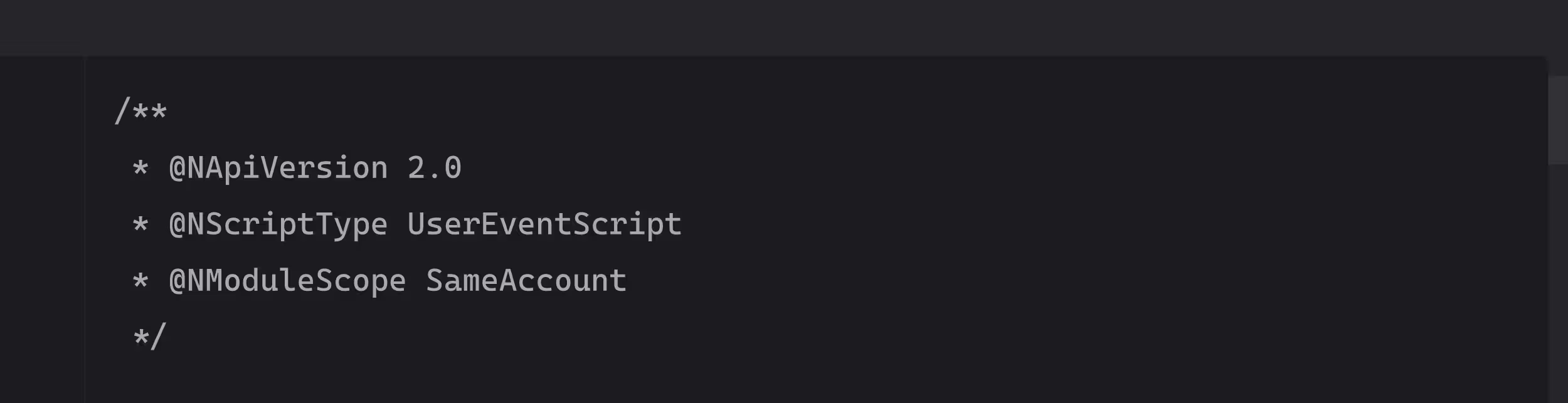
The simplest part of migration. Change one line.
Before:
javascript
After:
javascript
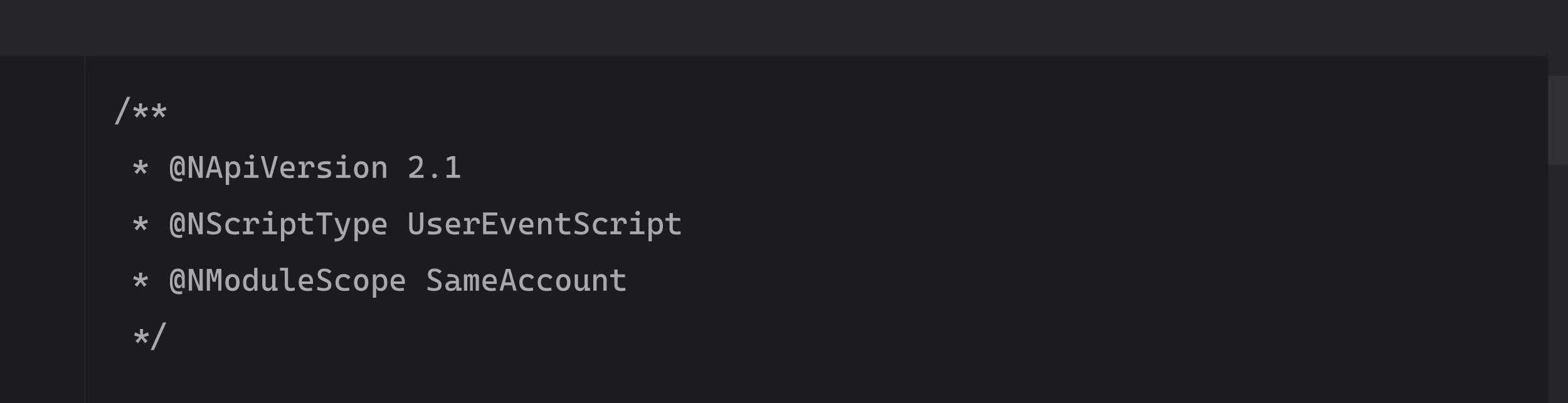
Verify these annotations are correct:
- @NScriptType matches your script type exactly
- @NModuleScope is set appropriately (SameAccount or Public)
- No typos (NetSuite is picky about header formatting)
That's it. Your script now runs in 2.1. But you're not done.
Step 4: Modernize the syntax (optional but recommended)
You can stop at step 3 and your script will work. But why not make it better while you're here?
Replace var with let or const:
javascript
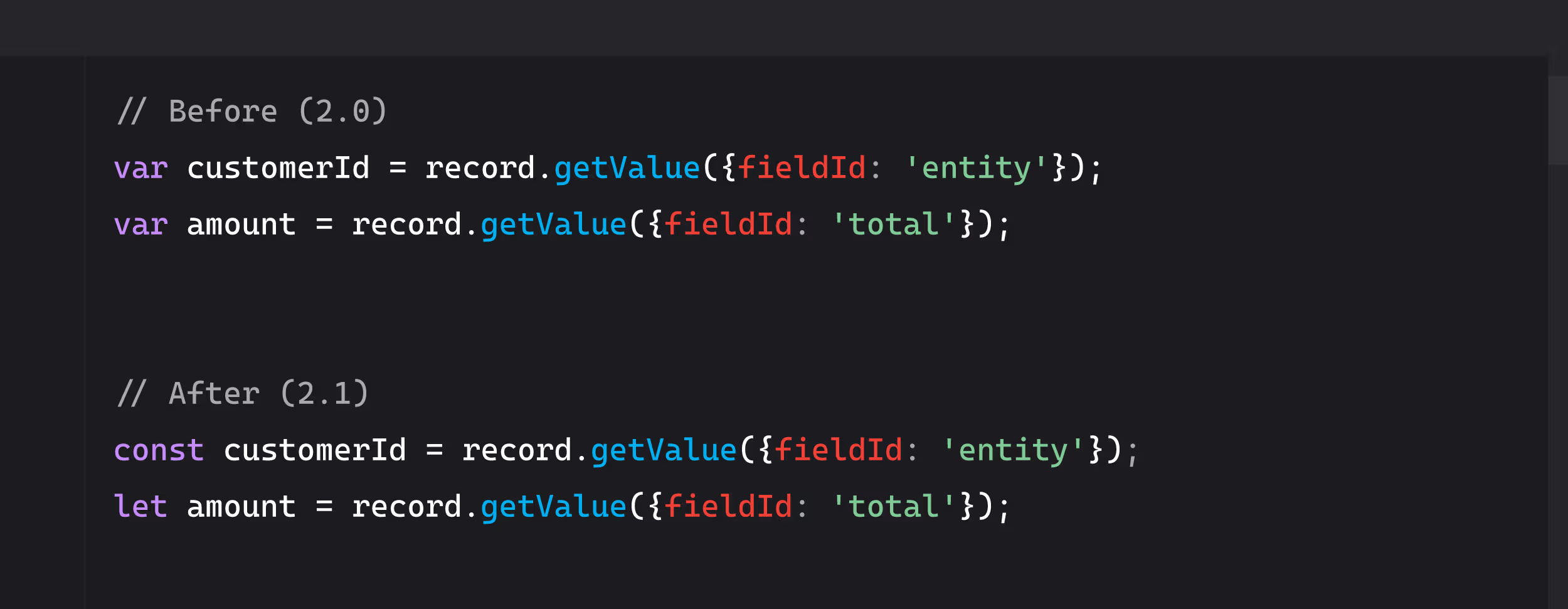
Use const for values that won't change. Use let for values that will. Never use var in new code.
Convert to arrow functions where appropriate:
javascript
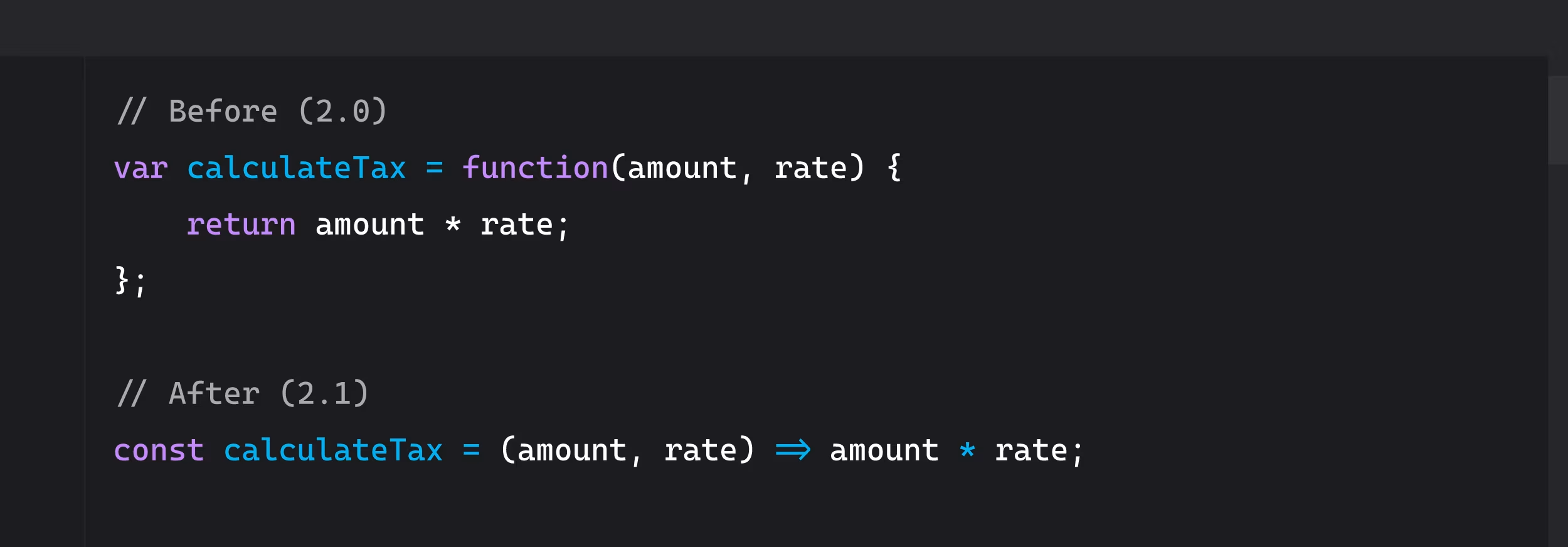
Use template literals instead of string concatenation:
javascript
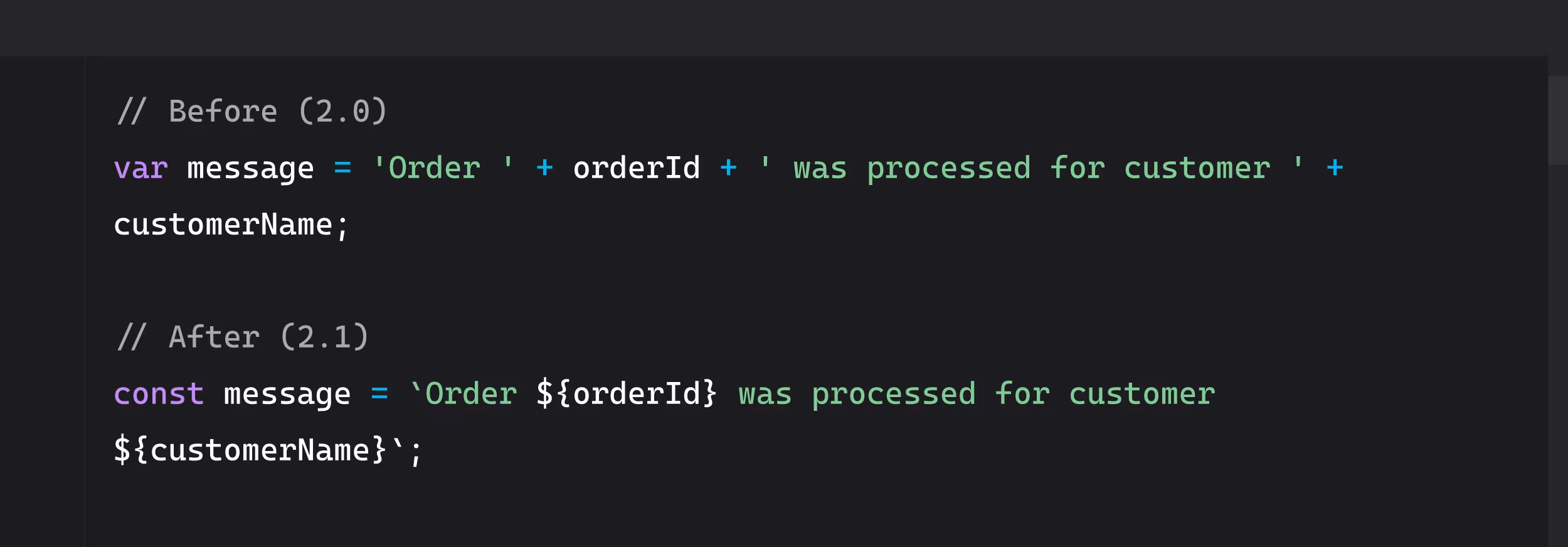
Add destructuring for cleaner code:
javascript
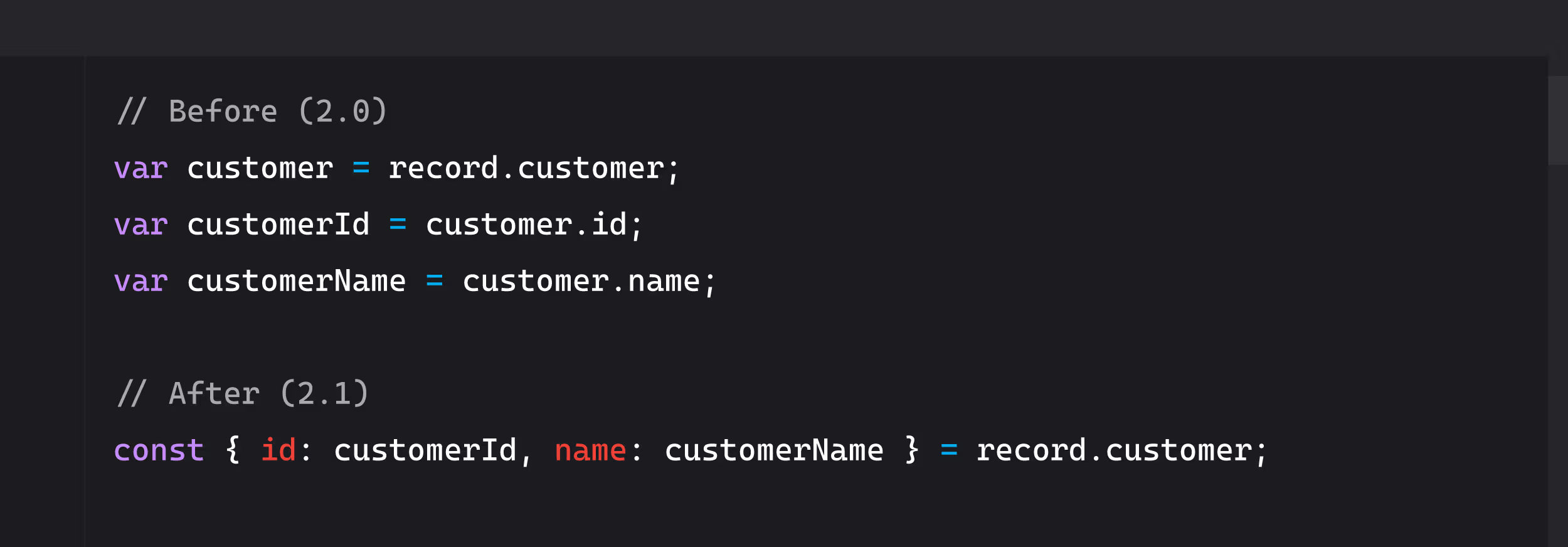
These changes don't affect functionality. They make code easier to read and maintain.
Step 5: Replace callbacks with async/await
This is the most impactful change and requires the most care.
Identify callback patterns in your 2.0 code:
javascript
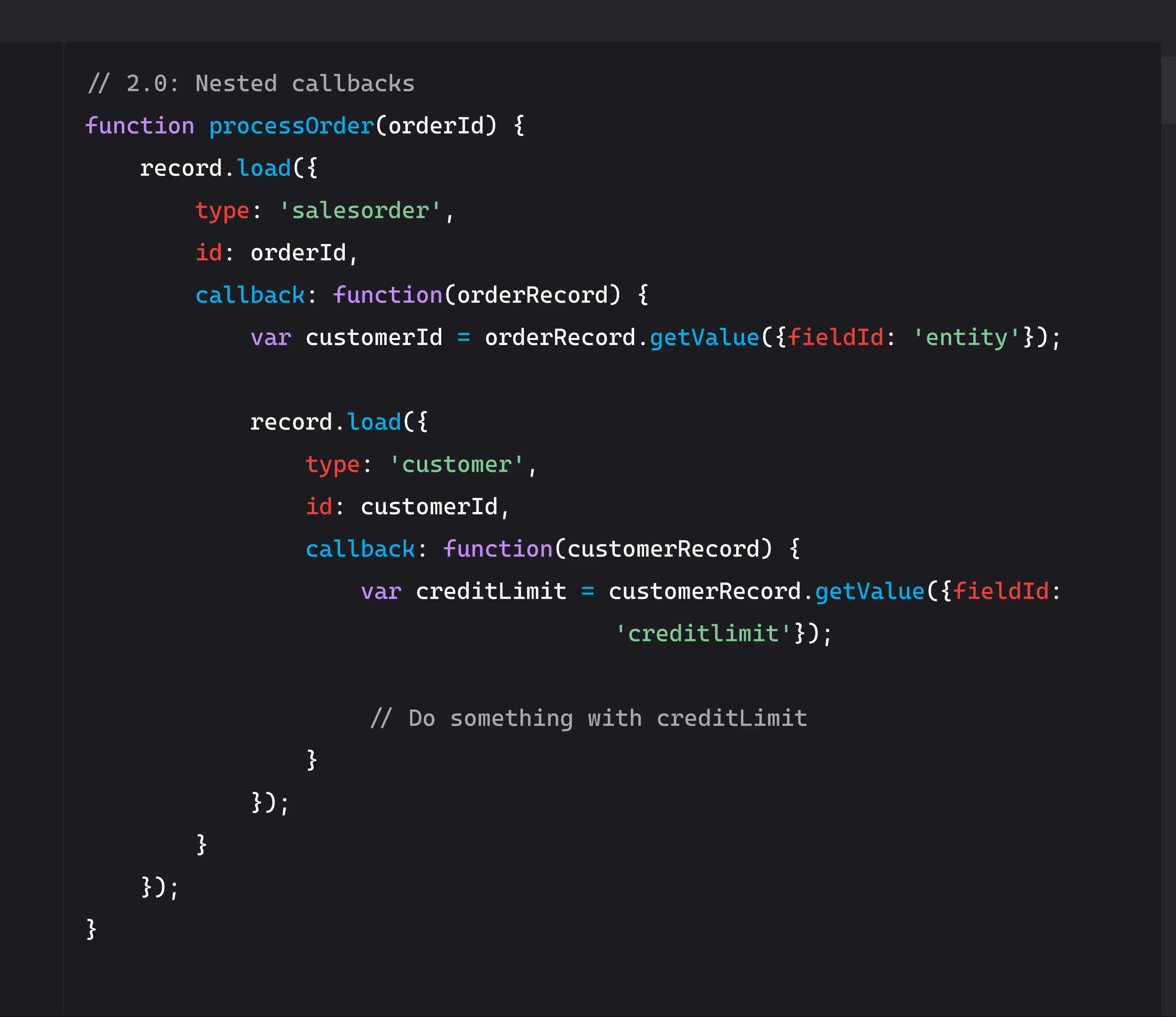
Convert to Promises and async/await:
javascript
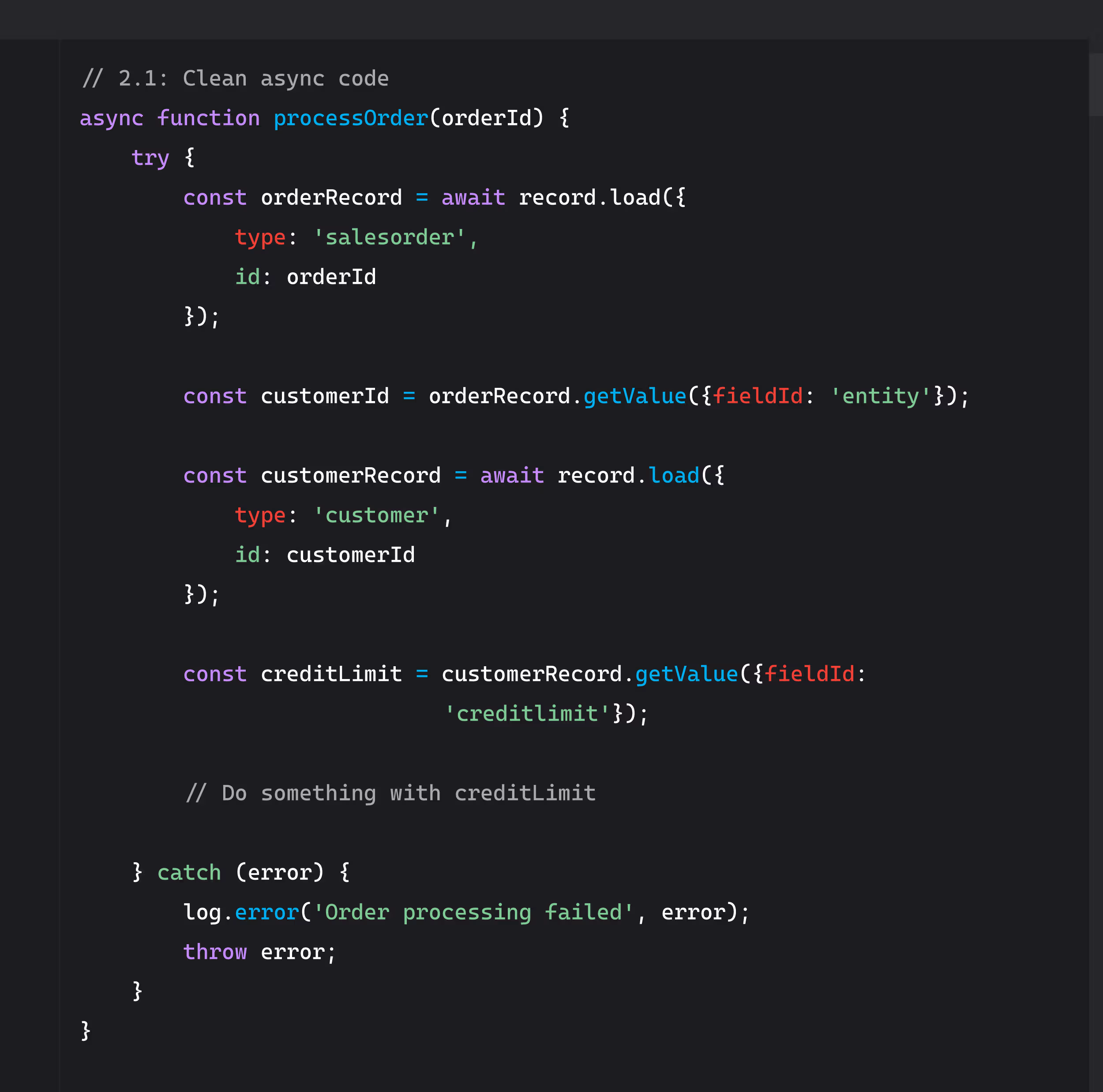
Key changes:
- Add async keyword to function declaration
- Use await before asynchronous operations
- Wrap in try/catch for error handling
- Errors are caught in one place instead of nested callbacks
Important: Not all SuiteScript modules support async/await. Check NetSuite documentation for each module you're using.
Step 6: Test in sandbox environment
Never deploy custom script changes directly to production. Ever.
Testing checklist:
- Deploy the updated script to your sandbox account first
- Test all entry points (beforeLoad, beforeSubmit, afterSubmit for User Event scripts)
- Verify the script triggers when expected
- Check that data updates correctly
- Confirm integrations still work
- Monitor governance unit consumption (should be similar to 2.0 version)
- Test error handling by intentionally causing failures
- Verify logging is working
Things to watch for:
- Script doesn't deploy (syntax errors)
- Script deploys but doesn't execute (runtime errors)
- Script executes but produces wrong results (logic errors)
- Governance units spike unexpectedly
- Performance degrades
- Error messages that didn't appear in 2.0
If any of these happen, don't proceed to production. Fix the issues first.
Step 7: Update documentation
Documentation is not optional. It's the difference between a successful migration and creating technical debt for the next person.
Document these details:
- What changed: "Upgraded from SuiteScript 2.0 to 2.1"
- Why it changed: "Replaced nested callbacks with async/await for better error handling and readability"
- When it changed: Date of migration
- Who changed it: Your name
- Testing results: What was tested and what passed
- Known issues: Any edge cases or limitations
- Rollback plan: Location of 2.0 version backup
Update JSDoc annotations:
javascript
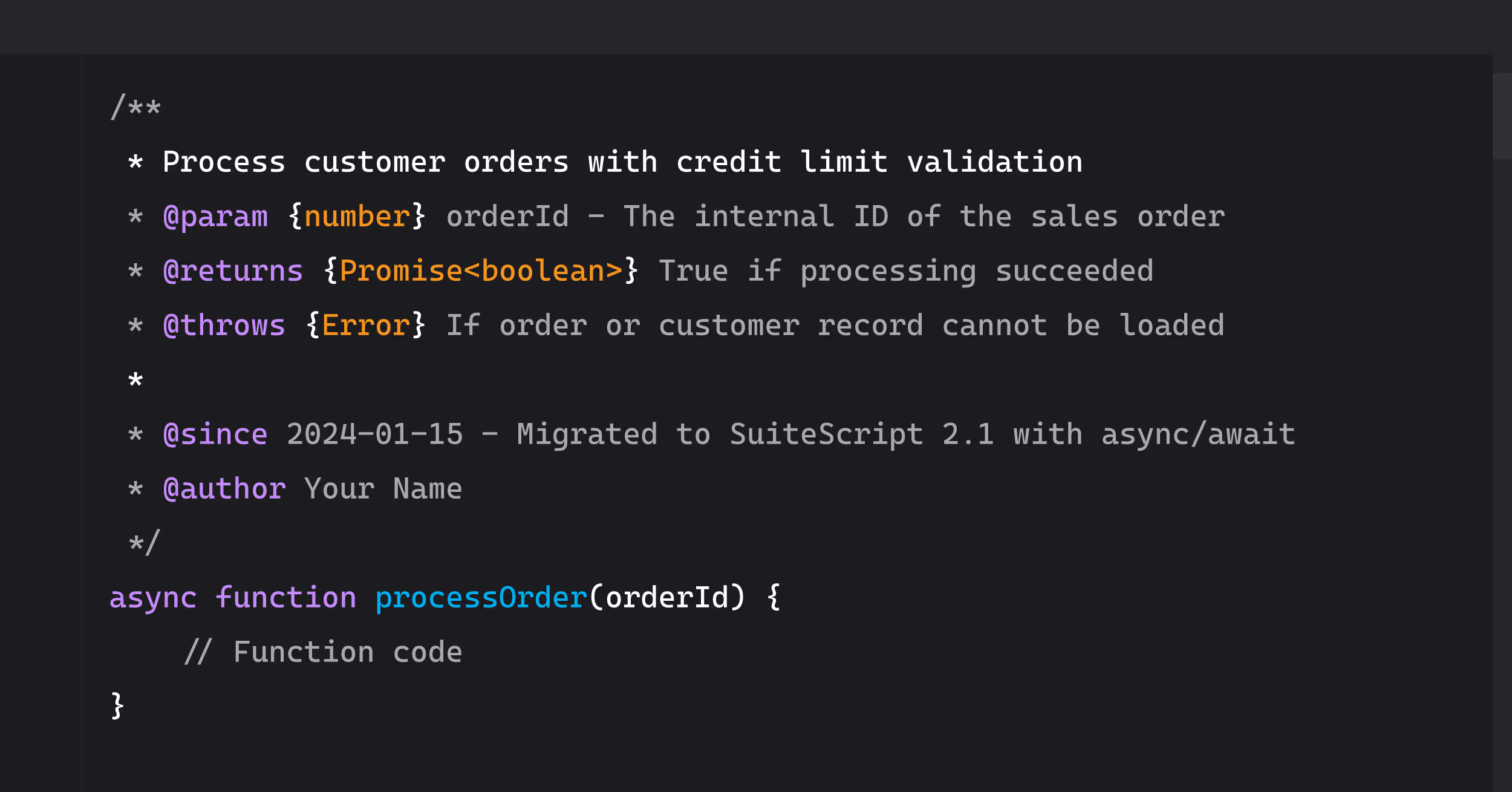
Good documentation survives developer turnover. It's what prevents the next person from spending 8 hours reverse-engineering your work.
Step 8: Production deployment with rollback plan
You've tested thoroughly. You're ready for production. But you need a safety net.
Pre-deployment checklist:
- Backup the current 2.0 version of the script
- Know how to roll back quickly (save deployment settings)
- Schedule deployment during low-traffic window (not month-end, not during peak hours)
- Have someone monitoring after deployment
- Prepare communication to users if something breaks
Deployment process:
- Upload the updated 2.1 script to your File Cabinet
- Update the script record to point to the new file
- Save the script record (this activates the change)
- Monitor execution logs immediately
- Test the first few executions manually if possible
- Watch for error logs or unexpected behavior
Post-deployment monitoring:
- Check execution logs for the first hour
- Verify scheduled scripts run successfully
- Confirm User Event scripts trigger appropriately
- Monitor for support tickets from users
- Check governance unit consumption
If something breaks:
- Don't panic
- Revert to the 2.0 version immediately (change script record back to old file)
- Document what broke and why
- Fix in sandbox before trying again
- Communicate status to stakeholders
Rollback plan example:
- Keep the old 2.0 script file in File Cabinet with clear naming: CustomerOrderScript_v2.0_BACKUP.js
- Document the exact deployment settings (script deployments, audiences, triggers)
- Test rollback procedure in sandbox first
- Know that you can revert in under 5 minutes if needed
SuiteScript 2.1 Breaking Changes and Compatibility Checklist
Most 2.0 scripts run fine in 2.1 with just a header change. But there are edge cases that break.
Common breaking changes
Strict mode enforcement:
SuiteScript 2.1 runs in JavaScript strict mode. Some patterns that work in 2.0 will throw errors in 2.1.
What breaks in strict mode:
javascript
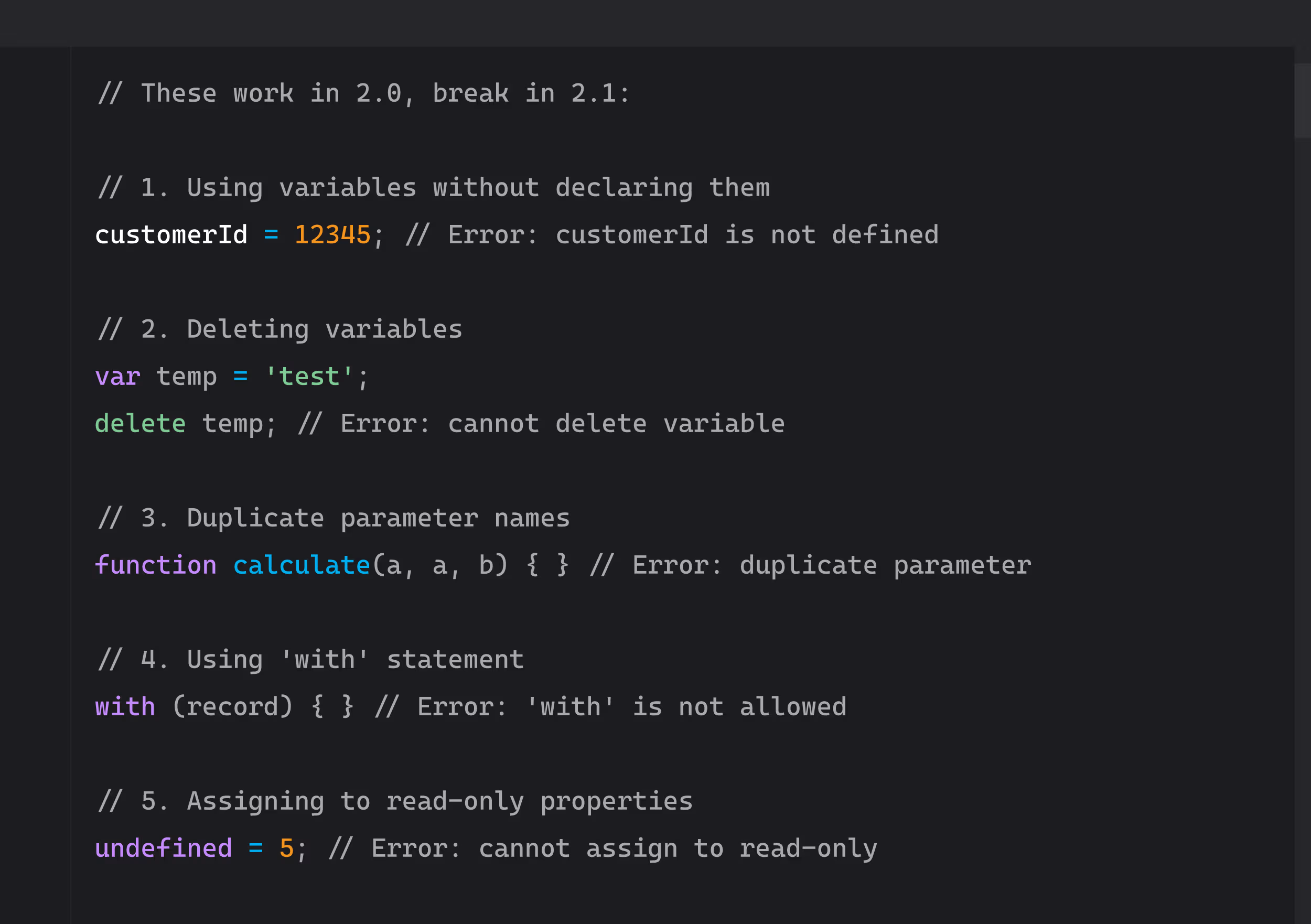
Fix these before migrating.
Variable scoping changes (let/const vs var):
javascript
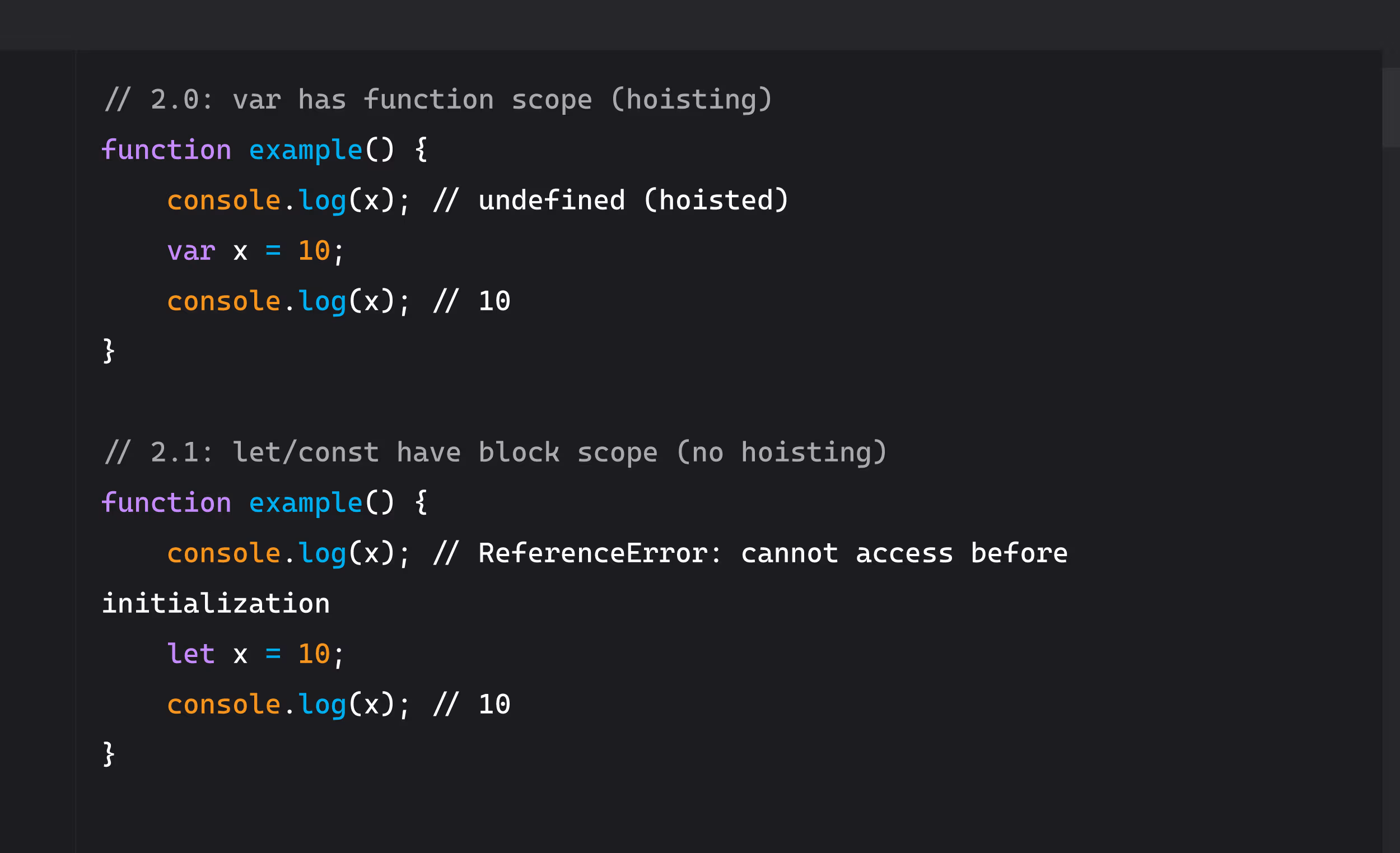
If your code relies on hoisting behavior, it will break in 2.1 when you switch from var to let/const.
Arrow function context (this behavior):
javascript
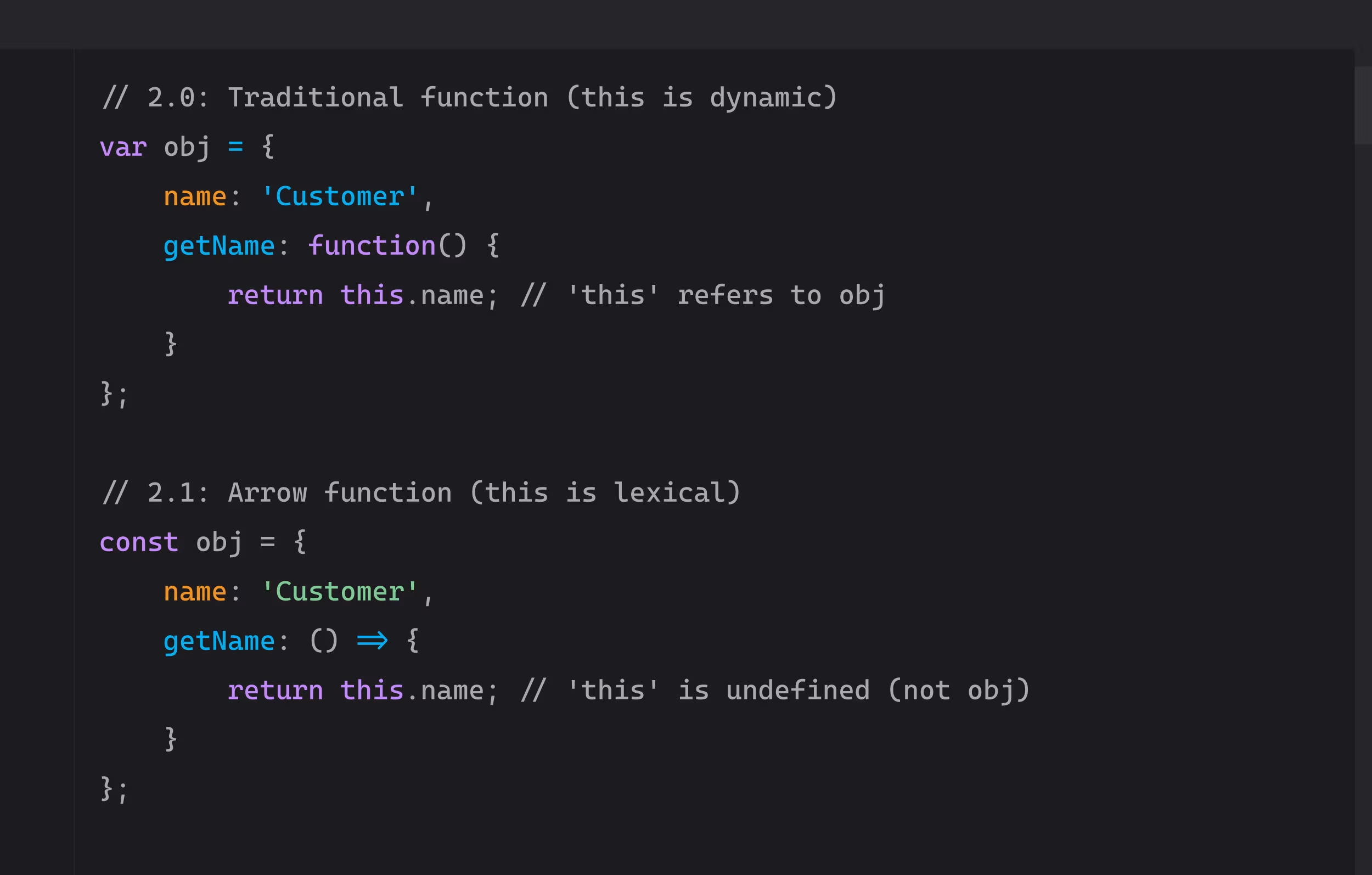
Don't blindly convert all functions to arrow functions. Understand this context first.
Template literal gotchas:
javascript
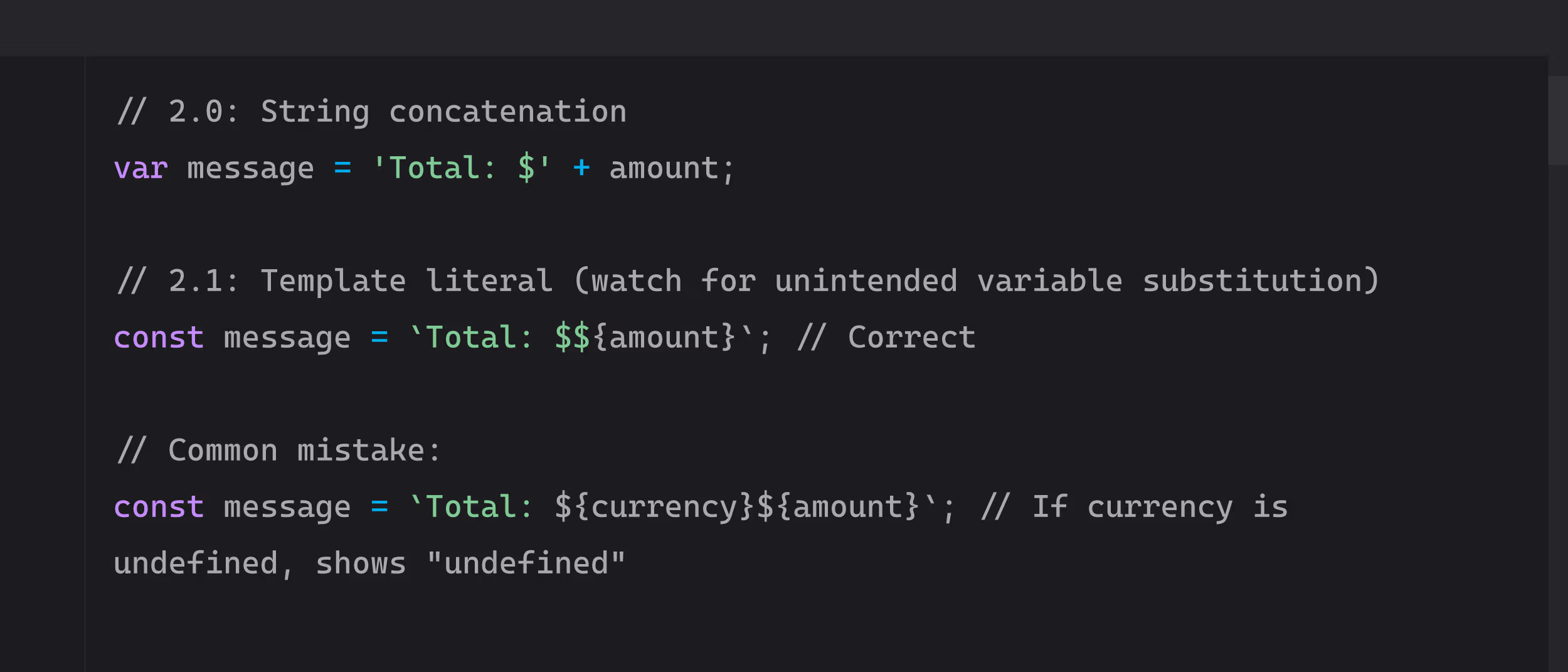
Template literals don't fail silently. They show "undefined" if variables aren't set.
Compatibility checklist
Before migrating a script, verify these don't exist in your code:
Does your script use eval() or with()? (Both break in 2.1 strict mode)
- eval() is a security risk anyway (don't use it)
- with() statement is deprecated (rewrite the code)
Relying on hoisting behavior? (Changes with let/const)
- Search for variables used before declaration
- Replace var with let/const carefully
- Test all code paths after changing
Using arguments object? (Different in arrow functions)
- Arrow functions don't have arguments object
- Use rest parameters instead: (...args) =>
Third-party libraries compatible with ES6?
- Check any external libraries you're importing
- Verify they work with strict mode
- Test thoroughly in sandbox
Global variable pollution?
- 2.0 forgives undeclared variables (they become global)
- 2.1 throws errors immediately
- Use const or let for all variable declarations
Error handling patterns
Error handling improves significantly in 2.1 with async/await.
SuiteScript 2.0 error handling:
javascript
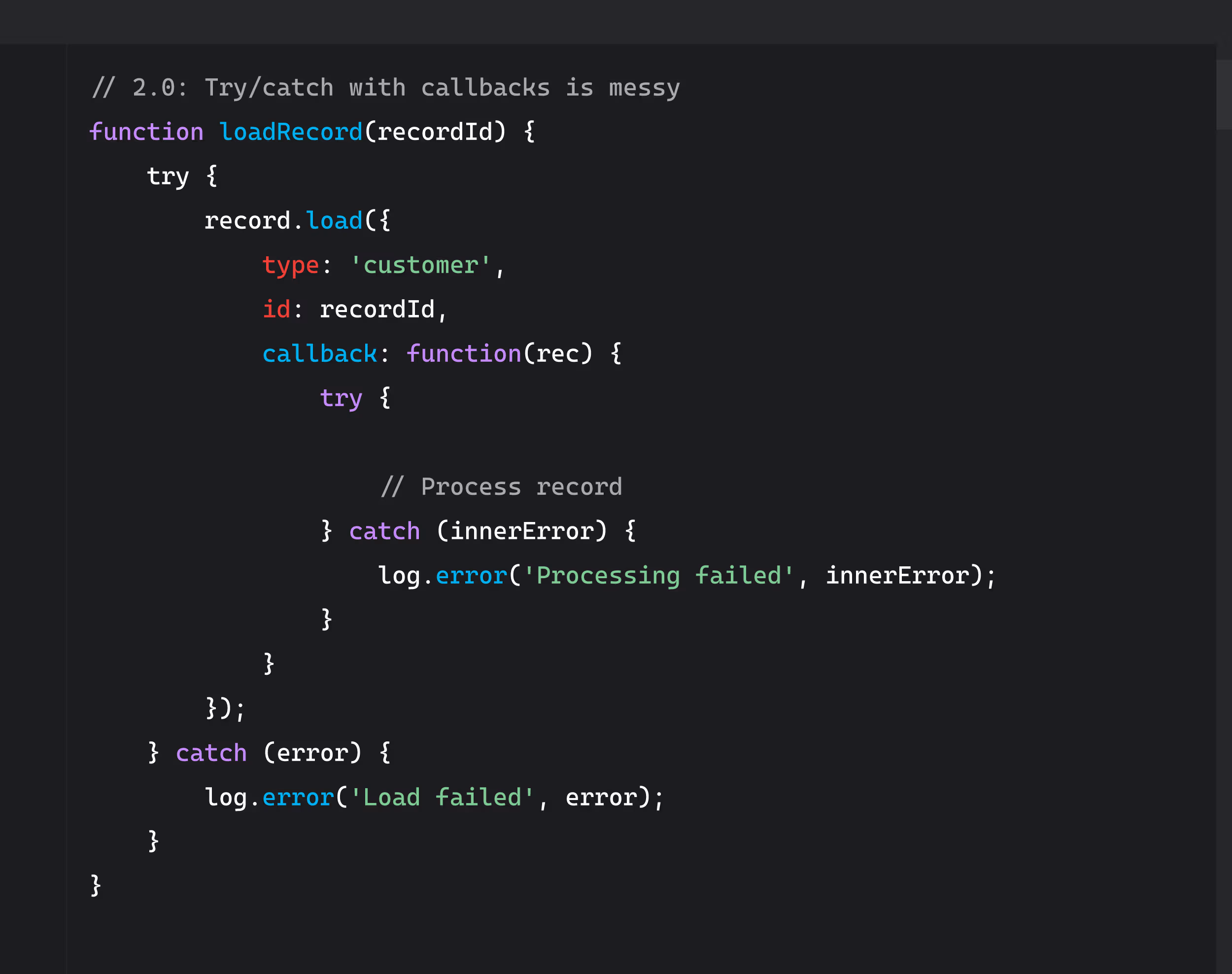
Nested try/catch blocks are confusing and error-prone.
SuiteScript 2.1 error handling:
javascript
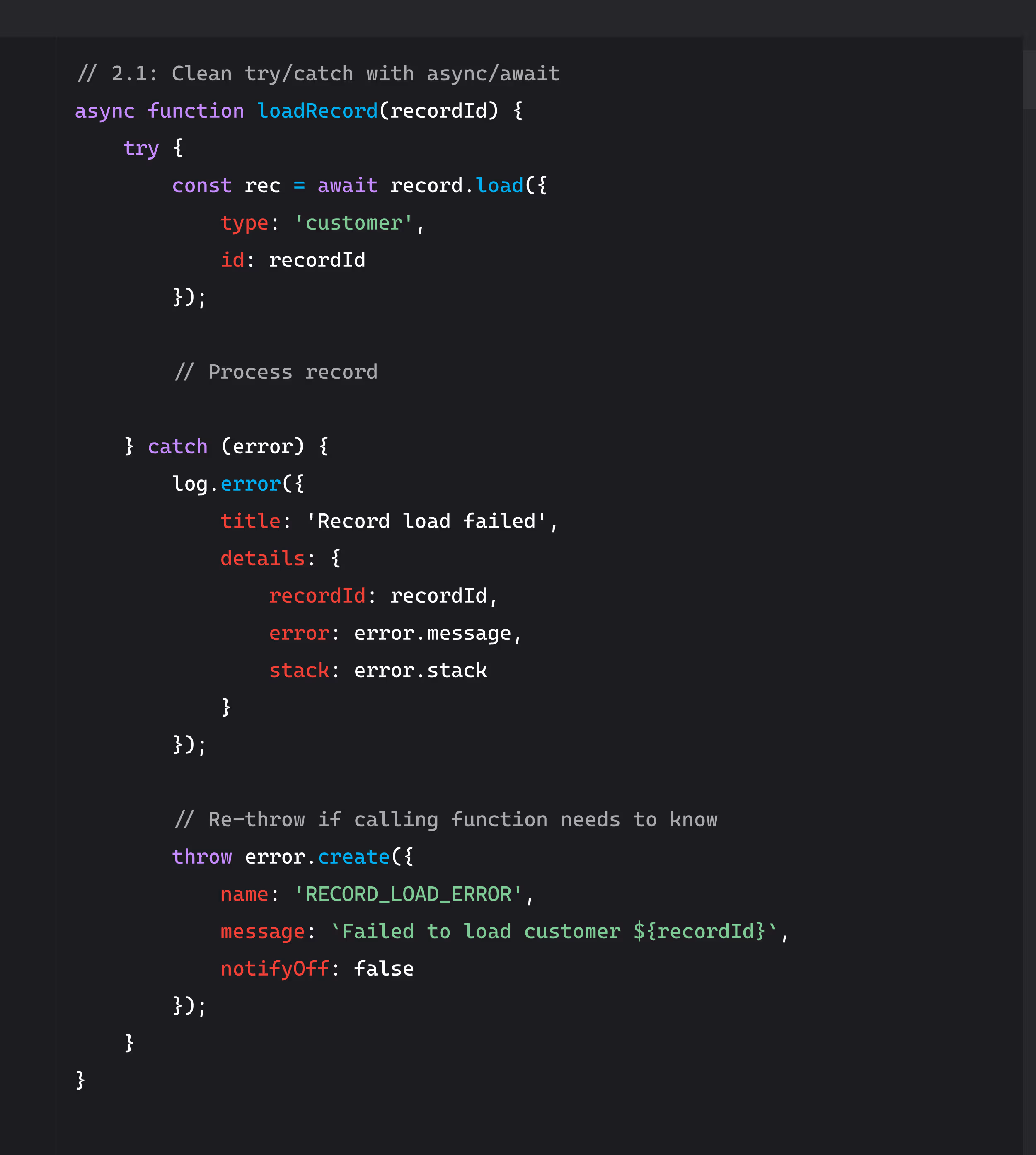
Best practices for error handling in 2.1:
- Use error.create() for custom error types
- Log governance units consumed when errors occur
- Include context (record IDs, field values) in error logs
- Use structured logging (title + details object)
- Re-throw errors if calling function needs to handle them
Debugging async code:
Async/await makes debugging easier because stack traces are clearer. But watch for these issues:
- Unhandled promise rejections (always use try/catch with await)
- Race conditions (multiple async operations completing in unexpected order)
- Memory leaks (async operations that never complete)
SuiteScript 2.x: The Future-Proof Choice
There's a third option beyond 2.0 and 2.1: @NApiVersion 2.x. This auto-selects the latest version NetSuite supports.
What @NApiVersion 2.x means
When you set @NApiVersion 2.x, NetSuite automatically uses the highest 2.x version available.
Currently that means:
- Your script runs in 2.1 (the latest version available now)
- When NetSuite releases 2.2, your script automatically upgrades
- When 2.3 comes out, same thing
The promise: Future-proof your scripts. Write once, benefit from future improvements automatically.
The risk: You have less control over when your scripts adopt new features or breaking changes.
When to use 2.x
Good use cases for @NApiVersion 2.x:
- New development projects where you want latest features
- Long-term maintenance scripts that need ongoing compatibility
- Scripts that don't rely on version-specific edge cases
- Development teams with strong testing protocols
When it makes sense:
- You have comprehensive test coverage
- You test scripts in sandbox before every NetSuite release
- Your team monitors NetSuite release notes for breaking changes
- You can react quickly if an update breaks something
The risk
@NApiVersion 2.x is convenient but comes with tradeoffs.
Potential issues:
- Less control: NetSuite decides when your script upgrades, not you
- Breaking changes: Future versions might deprecate patterns you rely on
- Testing burden: You need to test against every NetSuite release
- Unpredictable behavior: Scripts might behave differently after NetSuite updates
Real scenario: NetSuite releases SuiteScript 2.2 with a breaking change to how N/search handles null values. Your script using @NApiVersion 2.x automatically adopts 2.2. Suddenly searches that worked yesterday return different results. You didn't change anything, but your script broke.
Mitigation strategies:
- Monitor NetSuite release notes religiously
- Test all custom scripts in sandbox before every NetSuite release
- Have rollback capability (can you quickly change 2.x to 2.1?)
- Document which scripts use 2.x so you know what to watch
Recommendation: Use 2.x for new development if your team has strong testing discipline. Use explicit versions (2.0 or 2.1) for critical production systems where stability matters more than new features.
SuiteScript Governance, Testing, and Best Practices
Version doesn't change the rules. Governance units, performance optimization, and deployment best practices apply to 2.0, 2.1, and 2.x equally.
Governance units don't change between versions
NetSuite limits how much your scripts can do. These limits are identical across all 2.x versions.
Common operations and their governance costs:
- record.load(): 2 units
- record.save(): 4 units
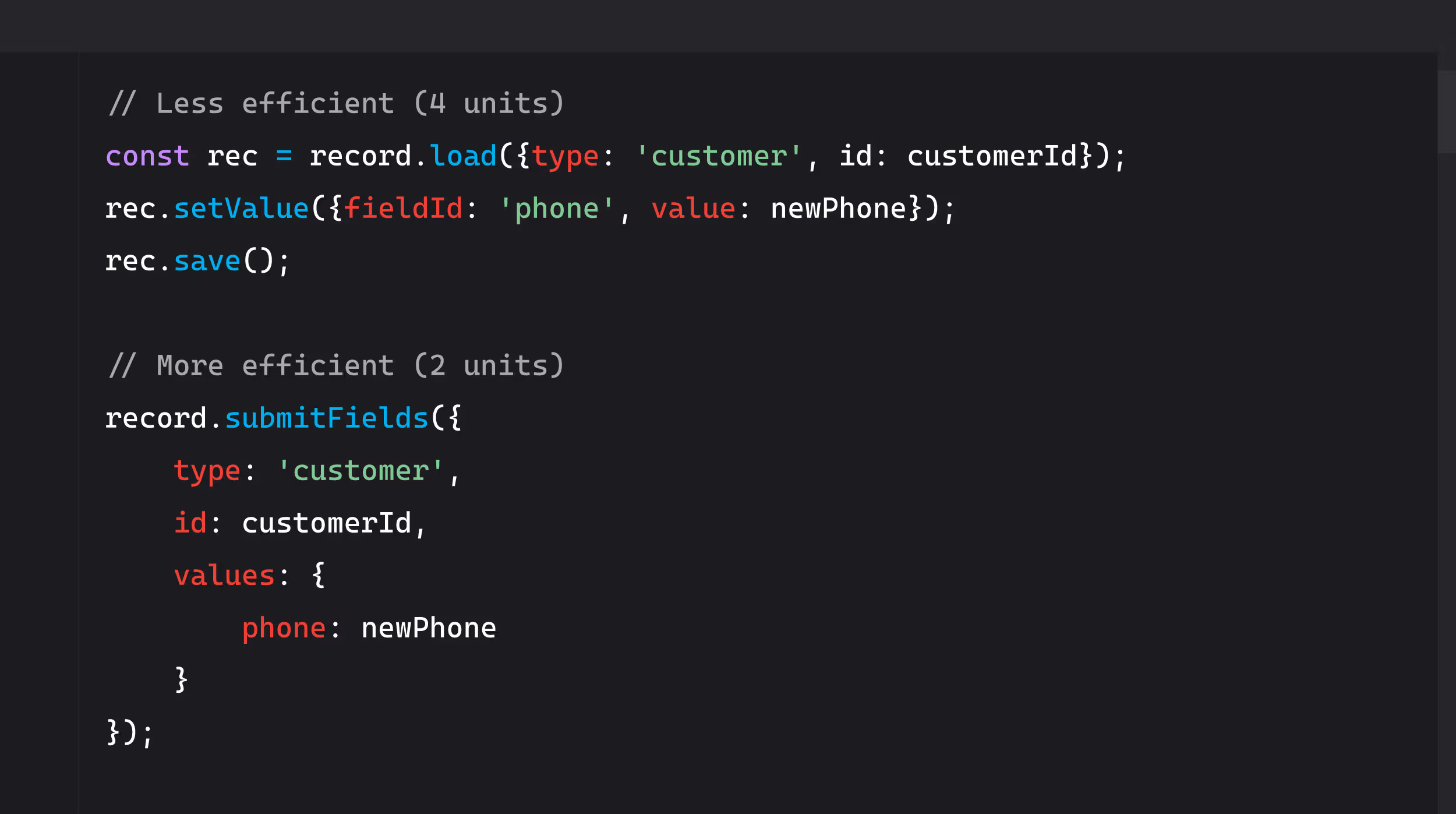
- record.submitFields(): 2 units (more efficient than save)
- search.create().run(): 10 units
- N/https.get(): 10 units
- N/task.create(): 20 units
Governance limits by script type:
- User Event: 1,000 units
- Scheduled: 10,000 units
- Map/Reduce: 10,000 units per stage
- RESTlet: 5,000 units
- Suitelet: 1,000 units
Optimization strategies that work in any version:
Use record.submitFields instead of record.save when possible:
javascript
Use N/search.runPaged for large datasets:
javascript
.avif)
Choose Map/Reduce over Scheduled for batch processing:
Scheduled scripts have a single 10,000 unit pool. Map/Reduce scripts get 10,000 units per stage (getInputData, map, reduce, summarize).
For processing 5,000 customer records, Map/Reduce can theoretically use 40,000 total units. Scheduled scripts would fail after 10,000.
Testing and linting setup
Professional development requires professional tools. Set these up regardless of SuiteScript version.
ESLint configuration for SuiteScript 2.1:
Create .eslintrc.json in your project:
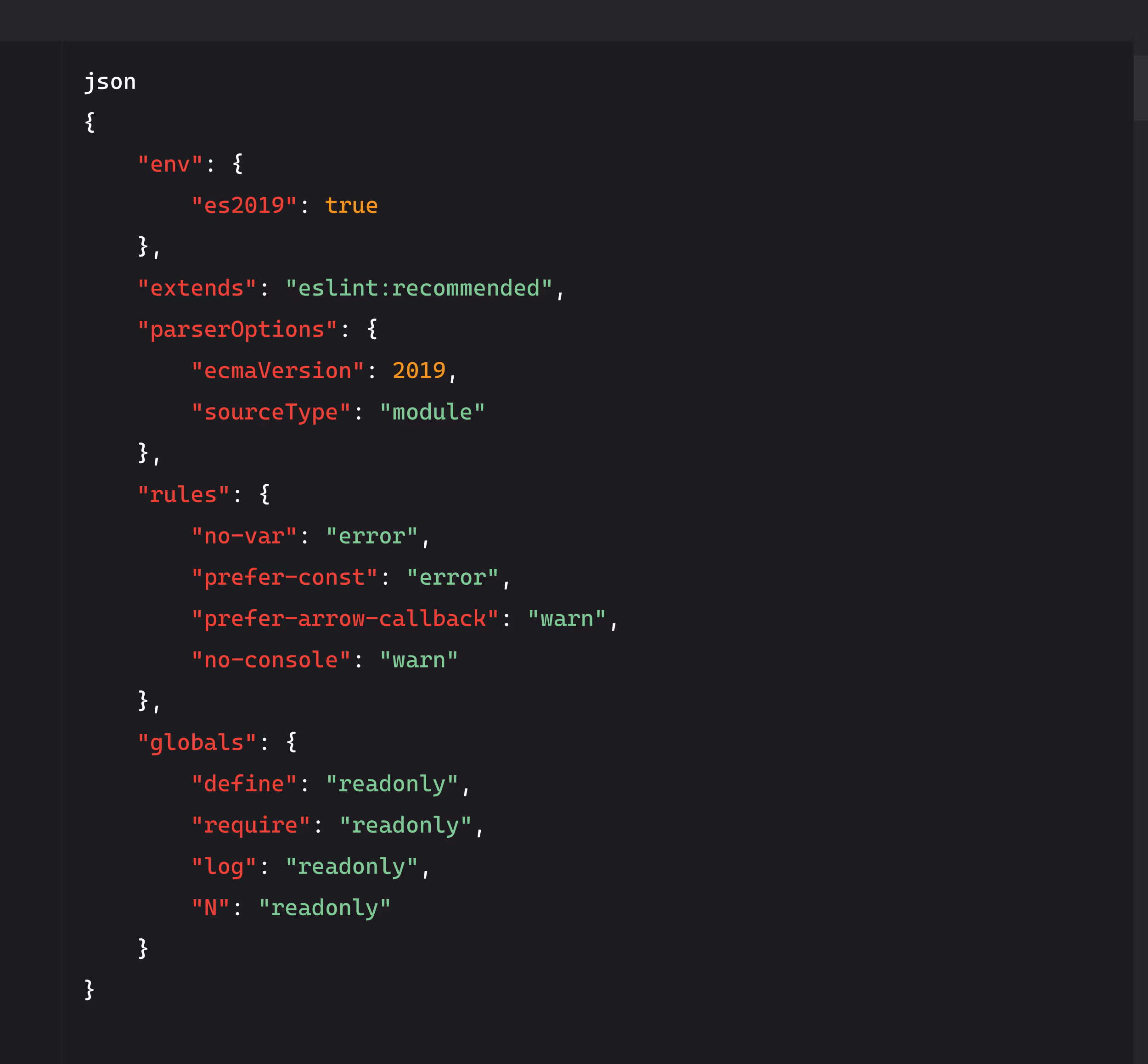
This catches common mistakes before deployment.
Jest stubs for unit testing:
SuiteScript modules don't exist in Node.js testing environments. Create mock stubs:
javascript
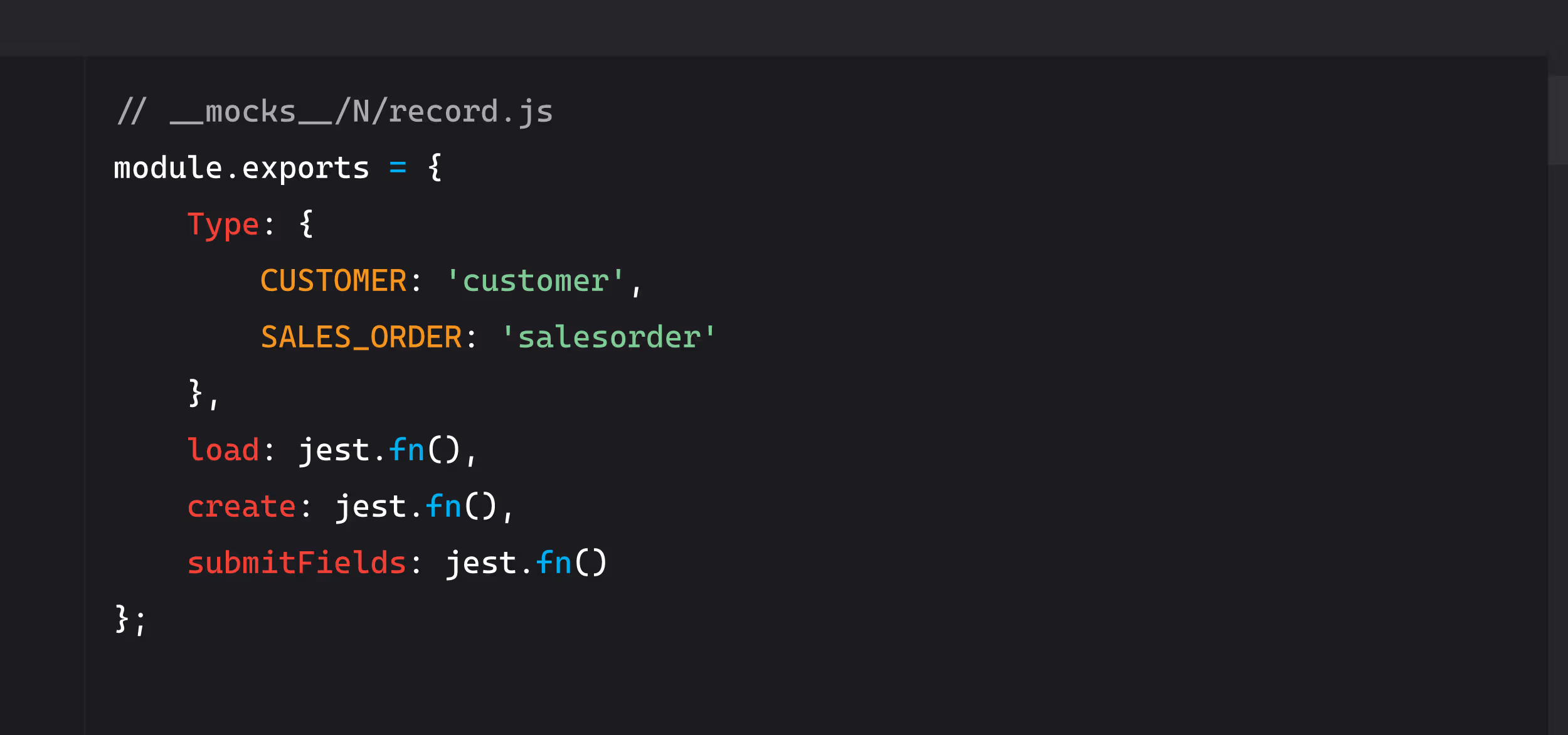
Then test your scripts locally before deploying to NetSuite.
SuiteCloud Development Framework (SDF) workflow:
SDF lets you manage NetSuite customizations in version control.
Basic SDF workflow:
- Initialize SDF project: suitecloud project:create
- Add custom scripts to project
- Deploy to NetSuite: suitecloud project:deploy
- Commit to Git
- Repeat
Benefits:
- Version control for all customizations
- Easy rollback to previous versions
- Team collaboration with code review
- Automated testing in CI/CD pipeline
TypeScript integration (SDF + IDE):
Add TypeScript definitions for autocomplete and type checking:
bash
npm install --save-dev @hitc/netsuite-types
Then configure tsconfig.json:
Now your IDE provides autocomplete for NetSuite modules and catches type errors before deployment.
Development workflow
A solid workflow prevents production incidents.
Recommended process:
- Develop locally with IDE, linting, and type checking
- Test with Jest using mocked NetSuite modules
- Deploy to sandbox via SDF
- Integration test in sandbox account
- Code review with team member
- Deploy to production during maintenance window
- Monitor execution logs for first 24 hours
Version control strategy:
Use Git with clear branching:
- main branch = production code
- develop branch = sandbox testing
- Feature branches for new work
Never commit directly to main. Always review code before production.
Rollback procedures:
Every production deployment needs a rollback plan:
- Tag production releases in Git: v1.0.0, v1.0.1, etc.
- Keep previous version files in NetSuite File Cabinet
- Document exact deployment settings
- Test rollback procedure in sandbox first
- Know you can revert in under 10 minutes
SuiteApp vs customization packaging
If you're building for multiple NetSuite accounts, packaging matters.
Account Customization Project (ACP):
- Bundles customizations for installation in multiple accounts
- Includes scripts, workflows, saved searches, custom fields
- Good for internal deployment across multiple subsidiaries
- Managed through SDF
SuiteApp:
- Commercial product sold through SuiteApp Marketplace
- Requires certification from NetSuite
- More rigorous testing and documentation requirements
- Better for ISVs building products to sell
Migrating bundles/ACP to SDF:
Older bundles may need migration to SDF for better version control:
- Export existing bundle from NetSuite
- Create new SDF project
- Import bundle objects to SDF
- Commit to version control
- Deploy via SDF going forward
This gives you Git-based version control and easier team collaboration.
The Custom Code Continuity Problem
Migrating from 2.0 to 2.1 is straightforward. The hard part is maintaining custom code over time without institutional knowledge walking out the door.
What happens when scripts aren't documented
Real scenario: New NetSuite admin starts at a company. Inherits 47 custom SuiteScripts. No documentation exists. Mix of 2.0 and 2.1 scripts. Nobody knows why they were written differently or what half of them do. The developer who built them left 18 months ago.
Then a NetSuite quarterly release breaks three scripts. The admin spends 16 hours debugging code nobody understands, trying to figure out:
- What was this script supposed to do?
- Why was it written this way?
- What other systems depend on it?
- Is it safe to modify?
- What's the rollback plan?
This is technical debt in action. The migration from 2.0 to 2.1 was easy. Maintaining it over time without documentation is hell.
Version mixing in production
Can you mix SuiteScript 2.0 and 2.1 in one account?
Yes. NetSuite doesn't care. You can have 20 scripts on 2.0, 15 on 2.1, and 10 on 2.x all running simultaneously.
But should you?
Only if you have a very good reason and document it clearly.
Why mixing creates technical debt:
- Inconsistent code style across scripts
- Different error handling patterns
- Harder for new developers to understand codebase
- More complexity during NetSuite release testing
- Greater chance of breaking something during updates
When mixing is acceptable:
- Legacy 2.0 scripts that work fine and aren't actively maintained
- New development starting with 2.1 or 2.x
- Clear documentation explaining which scripts are which version and why
- Migration plan to eventually standardize
When mixing is a problem:
- No one knows which scripts are which version
- No documentation explaining why versions differ
- Active development happens in both versions randomly
- No governance around version selection
Release testing for custom scripts
NetSuite pushes quarterly updates. Are you testing your custom scripts against upcoming releases before they go live?
The problem: NetSuite tests platform features. They don't test YOUR custom code. If a NetSuite update breaks your scripts, that's your problem to fix.
What breaks during NetSuite releases:
- Deprecated APIs stop working
- Module behavior changes subtly
- New strict mode enforcement catches old code patterns
- Performance characteristics shift
- Error messages change (breaking scripts that parse error text)
Your testing responsibility:
- Monitor NetSuite release notes for breaking changes
- Test all custom scripts in sandbox before production update
- Verify integrations still work
- Check governance unit consumption hasn't spiked
- Review error logs for new issues
- Have rollback plan ready if something breaks
If you're not doing this, you're gambling every quarter. Eventually a NetSuite update will break something critical, and you'll find out in production.
Custom Code De-Risking Protocol™
Here's what professional custom code governance looks like:
Document every script:
- What it does (business purpose)
- Why it was written this way (technical decisions)
- What version it uses and why
- Dependencies (what else relies on this script)
- Last tested date
- Maintenance owner
Test migrations before production:
- Never deploy directly to production
- Always test in sandbox first
- Have comprehensive test cases
- Verify integrations work
- Check governance units
Maintain rollback capability:
- Keep previous version backed up
- Document deployment settings
- Test rollback procedure
- Know you can revert quickly
Continuous governance, not one-time migration:
- Regular code reviews
- Update documentation when scripts change
- Test against NetSuite releases quarterly
- Monitor for deprecated patterns
- Keep team trained on current standards
This isn't a project. It's a practice.
Migration from 2.0 to 2.1 takes days. Governance is forever. Get governance right, and migrations become routine. Skip governance, and every change is a risk.
Conclusion: Migration Is Easy, Continuity Is Hard
Let's bring this home.
SuiteScript 2.1 gives you modern JavaScript, async/await, better readability, and cleaner error handling. Migrating from 2.0 to 2.1 is straightforward:
- Change the header annotation
- Modernize the syntax (optional but recommended)
- Replace callbacks with async/await where it makes sense
- Test thoroughly in sandbox
- Deploy to production with a rollback plan
The technical migration is easy. Change one line, update some syntax, test it, ship it.
The hard part is maintaining custom code over time without knowledge loss:
- Developer leaves, documentation goes with them
- NetSuite release breaks undocumented scripts
- New admin can't tell which scripts are 2.0, 2.1, or 2.x
- Nobody knows why scripts were written a certain way
- Testing happens reactively (after things break) instead of proactively
Migration is a one-time project. Continuity is a continuous practice.
You need both.
Migrate to 2.1 for better code. Implement governance so the next person doesn't inherit technical debt.
Ready to Fix Your Custom Code Technical Debt?
Already on NetSuite with custom SuiteScript nobody documented? Need help migrating safely from 2.0 to 2.1 without breaking production?
Stockton10's Custom Code De-Risking Protocol™ does what ACS can't:
- Audit and document every custom script in your account
- Test migrations thoroughly in sandbox before production
- Maintain continuity so knowledge doesn't disappear when developers leave
- Govern ongoing changes so scripts don't become technical debt
We don't just migrate your code. We make sure it stays maintainable for the long term.
When custom code is documented, tested, and governed, NetSuite updates stop breaking things.
Contact Stockton10 to stabilize your custom SuiteScript.